You need a legal document. Maybe it's a lease agreement, a last will, an NDA, or an independent contractor agreement. You search online and find hundreds of free templates, along with paid services that charge per document or lock everything behind a monthly subscription.
The question isn't whether free templates exist. It's whether the free ones are good enough to actually use.
The short answer: some are. Most aren't. Here's how to tell the difference, and what to do once you've found one worth using.
What Makes a Legal Template Actually Useful
A template is only as good as the legal thinking behind it. Before you rely on any template, free or paid, check for these things:
Jurisdiction-specific language. A residential lease that works in Texas won't necessarily hold up in New York. State laws differ on notice periods, security deposit limits, disclosure requirements, and more. Generic templates that ignore jurisdiction are a risk. Look for templates that are written for your state and cite the relevant statutes.
Clear fill-in fields. Good templates mark every spot you need to customize: party names, dates, dollar amounts, specific terms. If a template reads like finished prose with no obvious blanks, you'll miss something. Look for clearly marked fields like [Party Name] or [Date] throughout the document.
Current legal standards. Law changes. A template written in 2019 might reference repealed statutes or miss new compliance requirements. Check for a last-updated date and whether the template references current law.
Proper structure. A well-drafted legal document follows a logical order: recitals, definitions, operative provisions, representations, remedies, general provisions. If the template jumps around or skips standard sections, it wasn't drafted by someone who does this for a living.
How Free Templates Compare to Paid Services
Let's be direct about what the major platforms offer and where they fall short.
LegalZoom
LegalZoom offers around 250 templates. You either pay per document or commit to a monthly subscription for unlimited access. Their AI tool (Doc Assist) can summarize documents you upload, but it doesn't help you edit or customize the template itself. You pay, you download, and you're on your own for the actual tailoring.
The most common complaint about LegalZoom is aggressive upselling. A single template purchase can turn into a much larger bill by the time you've declined (or not declined) all the add-ons. Users also report that editing a document after purchase requires paying for a new version entirely.
Rocket Lawyer
Rocket Lawyer offers roughly 300 templates, but there is no free tier. You need a membership after a 7-day trial. Their AI (Rocket Copilot) can review contracts and answer legal questions, but document access itself is gated behind the subscription.
The biggest issue users report: the free trial auto-converts to a paid subscription, and canceling isn't always straightforward. Some users have reported being billed for months after they thought they'd canceled.
What Free Gets You (When Done Right)
A properly built free template gives you the same starting point: a structured, jurisdiction-aware legal document, without the subscription or per-document fee. The tradeoff is that you're responsible for customizing it yourself.
That's a reasonable tradeoff for many documents. If you know what terms you need in your NDA or how your state handles security deposits, a good template gets you 90% of the way there.
The remaining 10%, the customization, is where AI can help without a monthly bill attached.
From Template to Finished Document
People use free legal templates for all kinds of things. Some are drafting startup formation documents. Others need agreements for a nonprofit. Some are putting together a lease, a will, or a contractor agreement. Whatever the need, the process is the same: find a solid template, make it yours, and export a clean document.
Here's what that looks like with Ezel.
Browse and Pick Your Template
Start at the template library. Filter by the type of document you need and your state. Every template includes state-specific language and statutory references where relevant.
Customize with AI Assistance
For a one-time payment (no subscription), you get three days of AI-powered editing. The AI works directly inside the document editor. You can:
- Ask it to fill in sections based on your specific situation. Describe your terms, and the AI drafts the language.
- Get clause-by-clause explanations. Not sure what an indemnification clause does or whether you need one? Ask.
- Adjust for your jurisdiction. Tell it your state, and it flags anything that might need updating.
- Rewrite sections in plain English if the document is going to someone without a legal background.
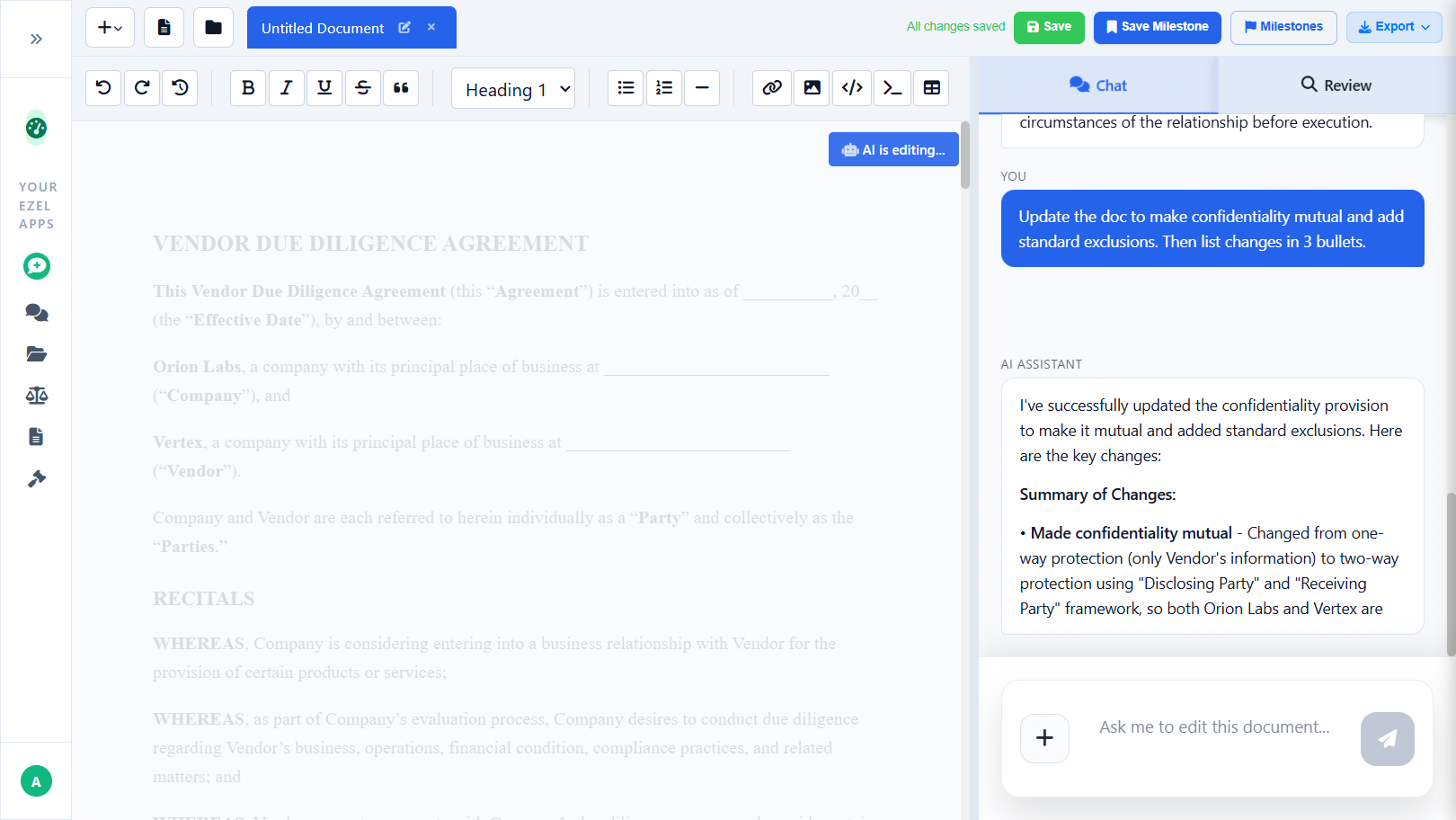
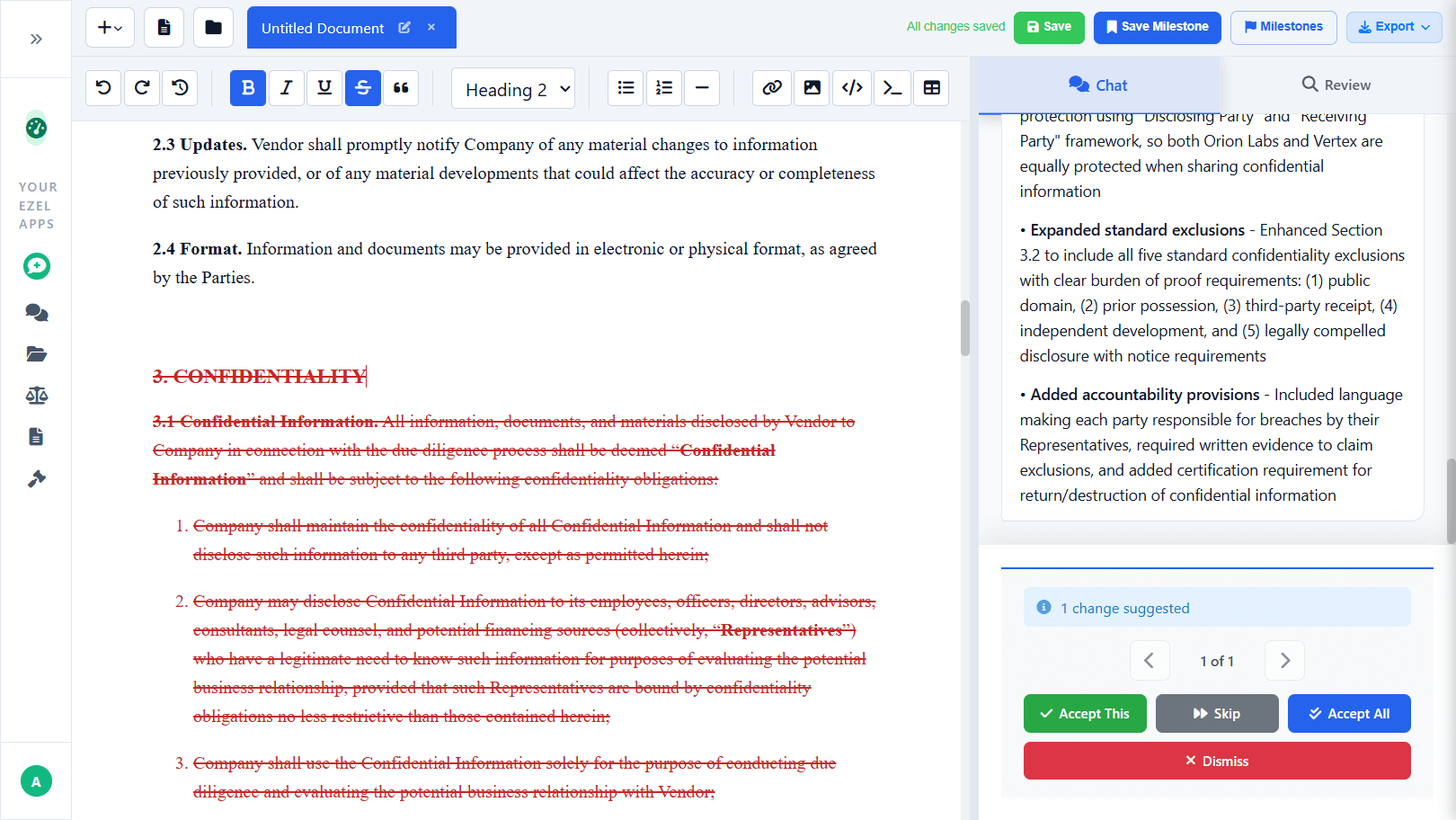
You stay in control the entire time. Every AI suggestion appears as a tracked change that you can accept, reject, or modify before it touches your document.
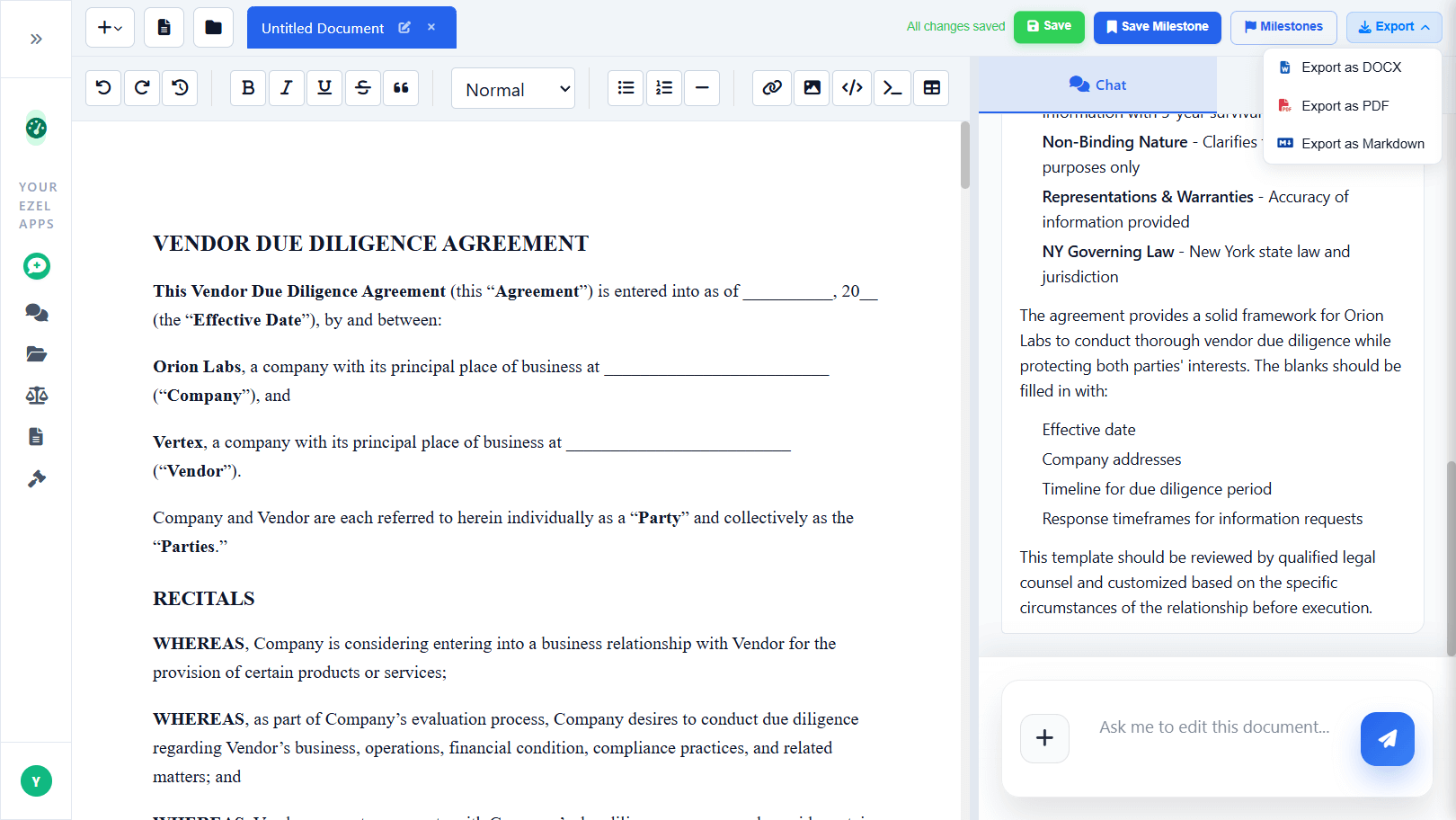
Export and Use
When you're done, export to DOCX, the format every law firm, court, and business expects. The export is clean, professionally formatted, and ready to send.
Why Ezel Is Different
Most legal document platforms make you pay before you can even see the template. Ezel takes a different approach:
| Ezel | LegalZoom | Rocket Lawyer | |
|---|---|---|---|
| Template access | Free | Paid per document or subscription | Subscription only |
| AI-powered editing | Yes, built into the editor | Summary only, no editing | Contract review only, no editing |
| State-specific templates | All 50 states | Limited | Limited |
| Subscription required | No | Yes, for unlimited access | Yes, for any access |
Templates on Ezel are free to browse, read, and copy. If you want AI assistance to customize the document, you can unlock it for a single payment. No recurring charges, no surprise bills. You pay once, use it for three days, and keep the finished document forever.
People are using this for everything from startup formation papers to nonprofit agreements to personal estate planning. The AI handles the heavy lifting of customization so you can focus on your specific situation instead of formatting and legal boilerplate.
What to Watch Out For With Any Free Template
Free doesn't automatically mean bad, but it doesn't automatically mean good either. Avoid templates that:
- Have no jurisdiction information. A template that claims to work everywhere usually works nowhere specific enough to rely on.
- Include no fill-in fields. If it looks like a finished document, it wasn't designed as a template. It's someone's old contract with the names removed.
- Show no update date. Legal requirements change. An undated template could be years out of date.
- Come from anonymous sources. If you can't tell who drafted the template or what legal expertise went into it, proceed with caution.
- Require you to "sign up" for free. If a site requires your email before showing you the template, the template is the lead magnet, not the product. The product is whatever they're about to try to sell you.
When a Template Isn't Enough
Templates work well for standard, repeatable legal documents: NDAs, leases, operating agreements, basic contracts, demand letters, powers of attorney. These follow predictable structures where the main variables are party names, terms, and jurisdiction.
Templates are not a substitute for legal counsel when:
- The stakes are unusually high (major litigation, large transactions)
- Your situation has unusual complexity (multi-party deals, cross-border issues)
- You're unsure what type of document you actually need
- The other side has a lawyer and you don't
A good template gets you a strong starting point. AI editing gets you a polished document. But for situations that fall outside the template, professional legal advice is still the right call.
Getting Started
Browse the free template library, find the document you need, and see for yourself whether it meets the standards outlined above. If you want AI help customizing it, the option is there. No account required, no subscription.
The goal is simple: get a good legal document without overpaying for it. The template is free. The AI is optional. The document is yours.