
Legal research is the foundation of good lawyering. It's also one of the biggest time drains in any practice. A straightforward motion might require three hours of research. A complex brief can swallow an entire day. And you know the sinking feeling when you discover a critical case at the last minute that you should have found earlier.
The traditional approach hasn't changed much in decades: pick your database, construct Boolean queries, wade through hundreds of results, read dozens of opinions, and hope you haven't missed anything important. It works, but it's slow, expensive, and often incomplete.
AI is changing this fundamentally. Not by replacing your legal judgment, but by making the search itself dramatically faster and more effective.
The Problem with Traditional Legal Research
Boolean Search Is a Blunt Instrument
Traditional legal databases require you to think like a computer. You build queries with AND, OR, NOT, and proximity operators, trying to anticipate exactly how courts have worded the legal concepts you're researching.
The problem: legal concepts don't map neatly to keywords. A search for "fiduciary duty" AND "breach" might miss cases that discuss "breach of the duty of loyalty" or "violation of fiduciary obligations." You end up running multiple searches with different keyword combinations, hoping to cover the gaps.
Experienced researchers develop this skill over years. But even the best Boolean searchers miss relevant cases because language is inherently varied.
The Cost Is Staggering
Westlaw and LexisNexis subscriptions run $400 or more per month for a solo practitioner. For a small firm with multiple attorneys, annual costs can reach five figures easily. These databases are powerful, but the pricing assumes BigLaw budgets.
Many small firm attorneys ration their research time because of cost. That means cutting corners on research, which is exactly where you can't afford to cut corners.
Volume Creates Noise
A broad search might return 500 results. A narrow search might miss key cases. Finding the balance requires experience, patience, and time you probably don't have. Sorting through results to find the five cases that actually matter is tedious work that AI handles far better than humans.
How AI Legal Research Works
AI-powered case law search doesn't just match keywords. It understands legal concepts.
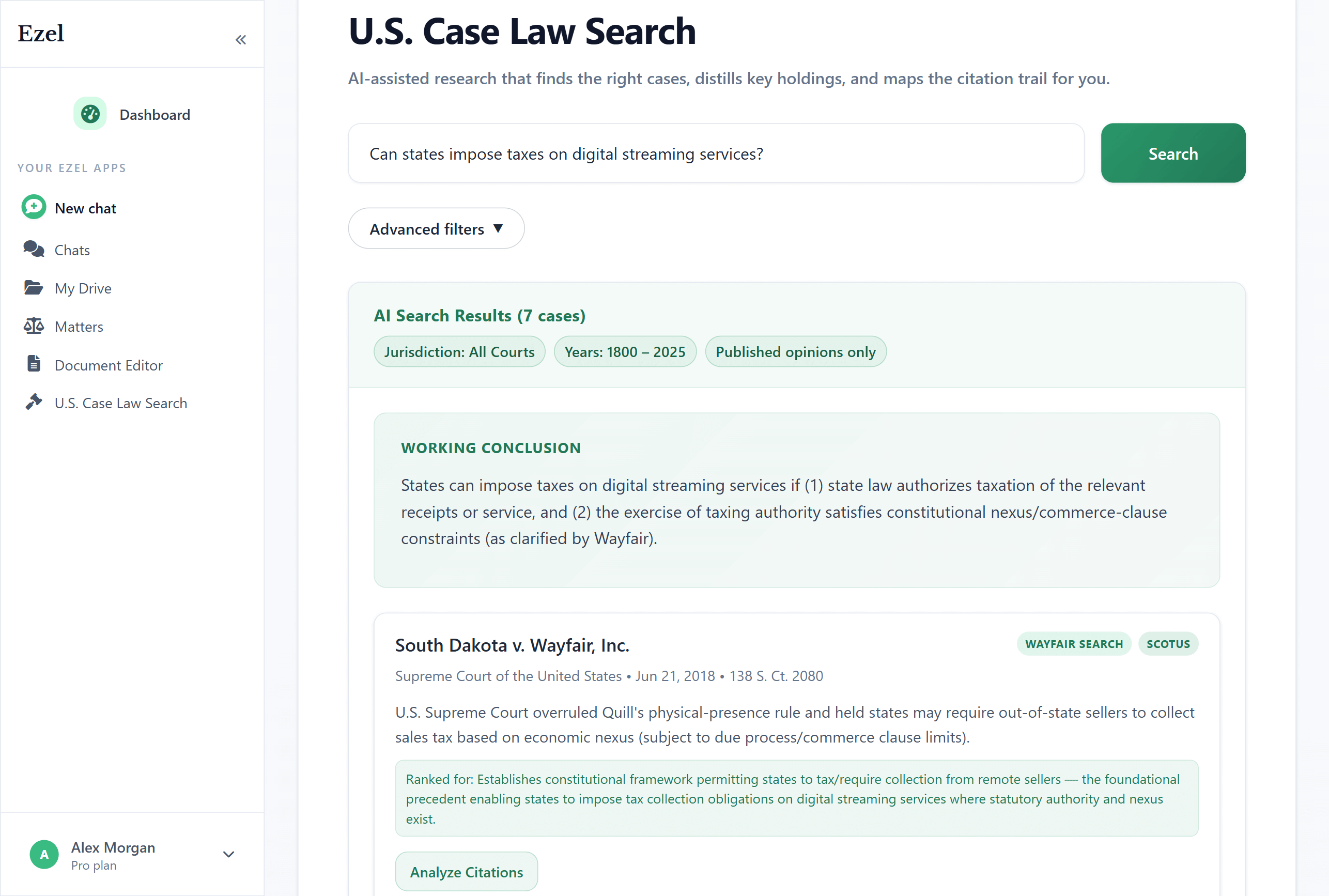
Natural Language Search
Instead of constructing Boolean queries, you ask questions the way you'd ask a colleague:
- "What are the elements of a breach of fiduciary duty claim in Delaware?"
- "Can a non-compete be enforced against an independent contractor in Texas?"
- "What's the standard for granting a preliminary injunction in the Ninth Circuit?"
- "Cases where a landlord was held liable for mold in a residential rental property"
The AI understands the legal concepts behind your question and finds cases that address them, regardless of the specific words the court used.
Semantic Understanding
This is the key difference. Traditional search matches strings of text. AI search understands meaning.
When you search for "employer retaliation for whistleblowing," AI finds cases about:
- Wrongful termination after reporting safety violations
- Adverse employment actions following regulatory complaints
- Retaliatory discharge for refusing to participate in illegal conduct
These cases might never use the word "whistleblowing," but they're directly on point. A keyword search would miss them entirely.
Intelligent Ranking
Not all relevant cases are equally useful. AI ranks results by actual legal relevance, not just keyword frequency. A Supreme Court decision directly addressing your issue appears before a district court opinion that mentions it in passing.
The ranking considers:
- How closely the case addresses your legal question
- The court level and jurisdiction
- Whether the case is still good law
- How frequently the case has been cited by other courts
What You Can Search
Federal Courts
- U.S. Supreme Court opinions dating back to the founding
- All Circuit Courts of Appeals
- Federal District Courts across every jurisdiction
State Courts
- All 50 state supreme courts
- State appellate courts
- Selected trial court opinions where available
Coverage Depth
Modern AI legal research platforms index millions of court opinions. Ezel, for example, provides access to over 2 million opinions spanning more than two centuries of American law.
A Better Research Workflow
Here's how AI changes the practical workflow of legal research.
Step 1: Start with Your Question
Don't think about search terms. Think about what you need to know. Type it as a question or statement:
"I need cases supporting the argument that a forum selection clause in a consumer contract is unenforceable as unconscionable under California law."
That's it. No Boolean operators, no field restrictions, no guessing at keywords. Just your legal question.
Step 2: Filter for Precision
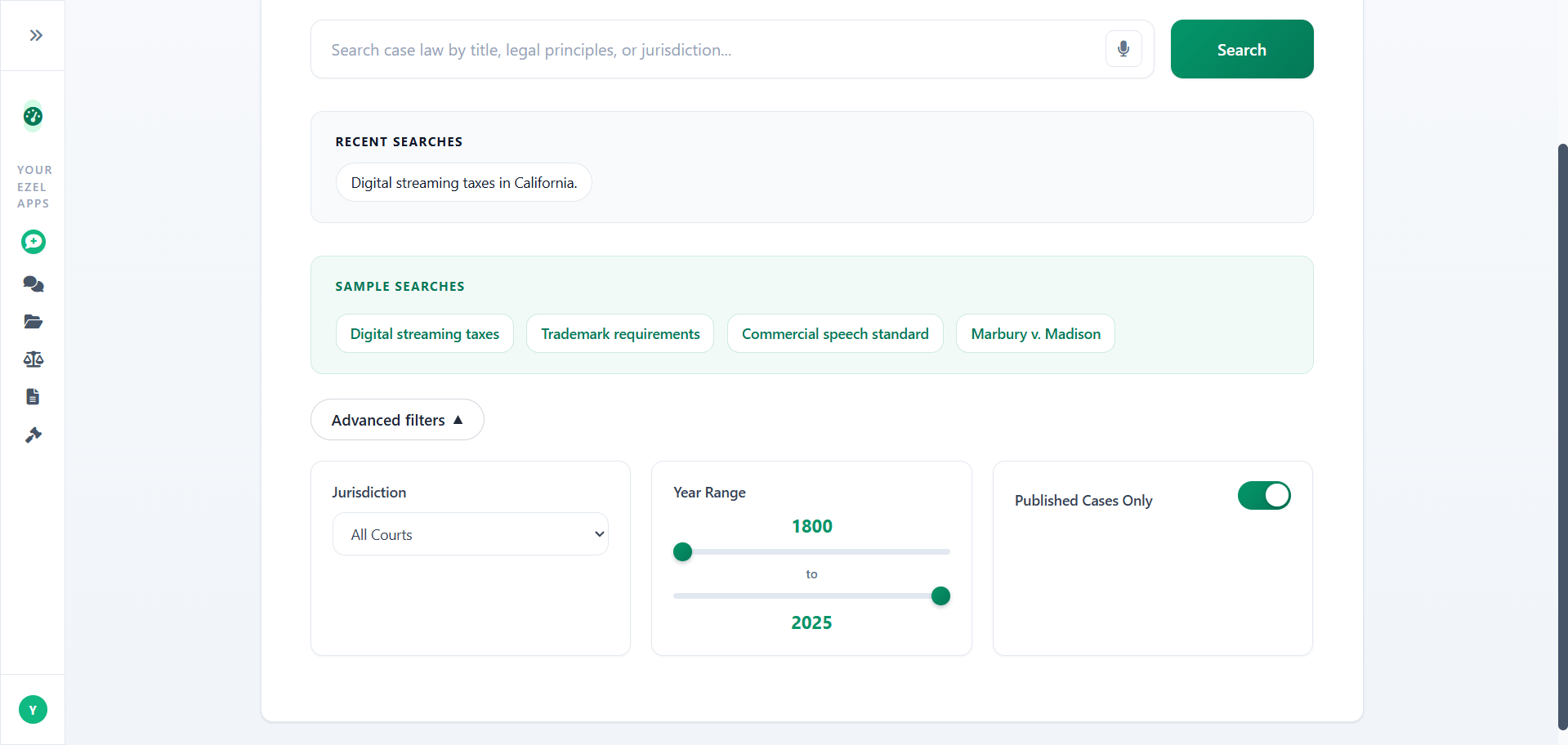
Once you have initial results, narrow them:
- Jurisdiction: Limit to your state, circuit, or specific court
- Date range: Focus on recent decisions or expand to landmark older cases
- Court level: Filter for appellate-only if you need binding authority
- Published opinions: Exclude unpublished opinions when you need citable authority
These filters work alongside the AI. The AI finds relevant cases; the filters refine the set.
Step 3: Read AI Summaries
For each case, the AI provides:
- A concise summary of the holding
- An explanation of why this case is relevant to your search
- Key legal principles the court articulated
- Procedural history highlights
This lets you quickly identify which cases deserve a full read and which you can skip. Instead of reading 30 opinions to find 5 useful ones, you read the summaries, identify your best cases in minutes, and go deep on only those.
Step 4: Verify and Validate
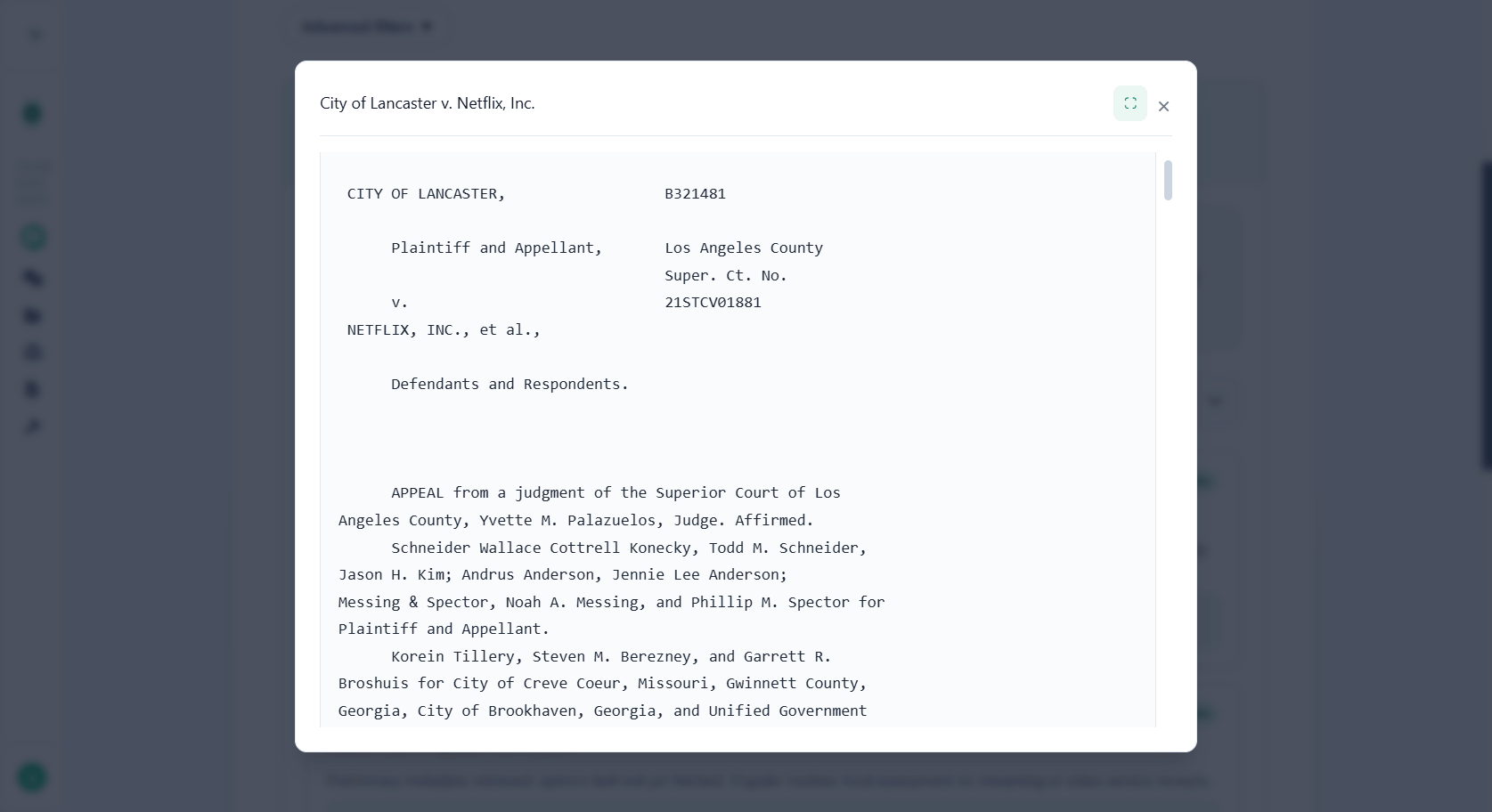
AI accelerates the search, but verification remains your responsibility. For every case you plan to cite:
- Read the full opinion, not just the summary
- Check that the holding actually supports your proposition
- Verify the case hasn't been overruled or distinguished
- Confirm it's valid authority in your jurisdiction
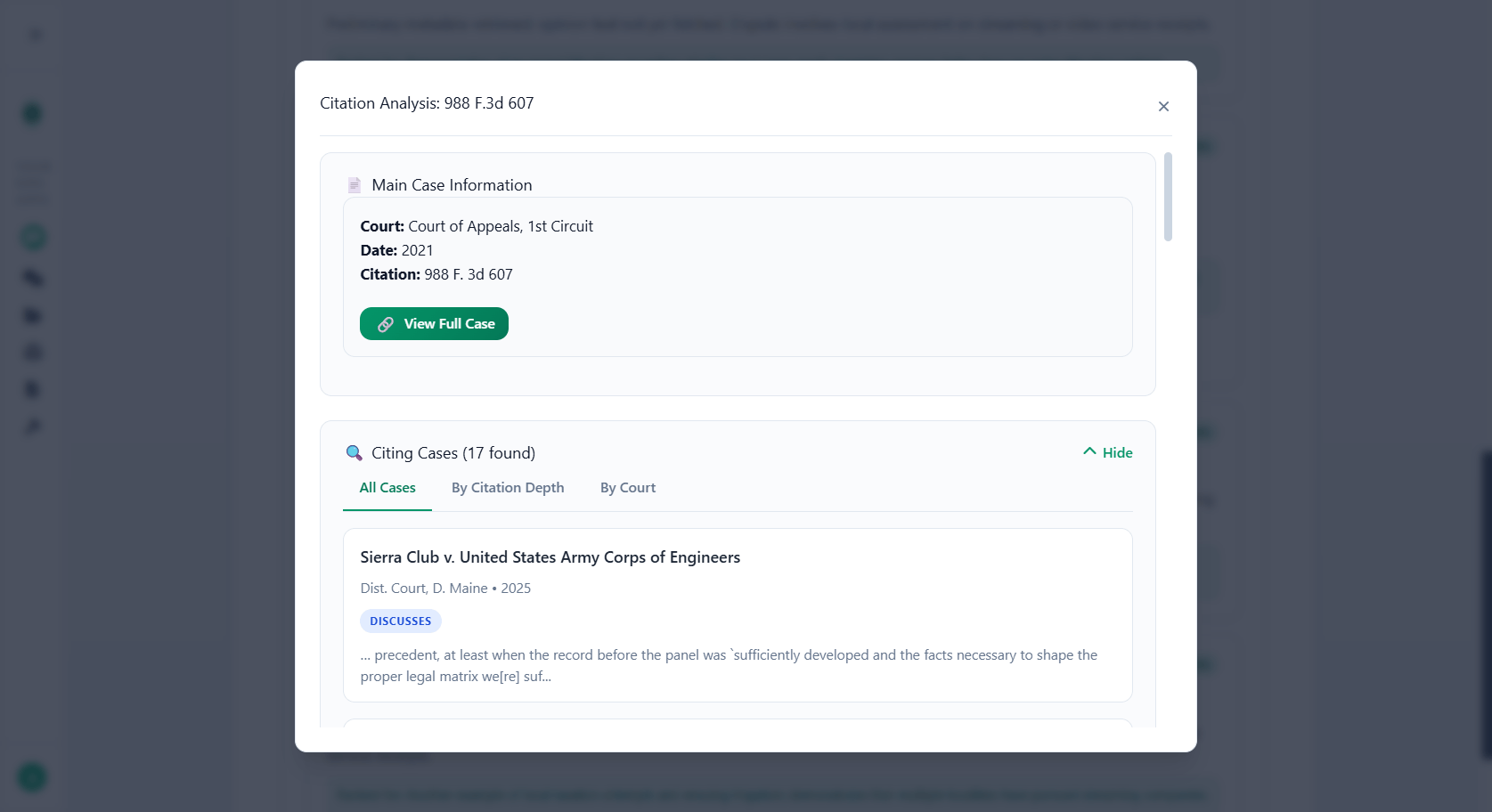
Good AI research tools build verification into the workflow. Citation checking, authority status, and treatment by later courts should be accessible alongside the search results.
Step 5: Save and Organize
Research compounds over time. Save your searches, bookmark key cases, and organize findings by matter. Next time you handle a similar issue, you're not starting from scratch.
Assign research sessions to specific matters so everything stays organized. When you need to revisit the research six months later for an appeal or related case, it's all there.
Practical Use Cases
Pre-Litigation Research
Before filing a complaint or answering one, you need to understand the legal landscape. AI search lets you quickly survey:
- Elements of each cause of action in your jurisdiction
- Recent trends in how courts are ruling
- Potential defenses the other side will raise
- Damage ranges in similar cases
What used to take a full day of research now takes an hour.
Motion Practice
Whether you're drafting a motion to dismiss, summary judgment brief, or discovery motion, you need supporting authority. AI search finds:
- Cases with similar fact patterns
- The standard of review in your jurisdiction
- How courts have ruled on the specific issue you're briefing
Draft stronger motions because you found better cases, not just the first cases that came up in a keyword search.
Due Diligence
Transactional lawyers researching regulatory issues, industry-specific case law, or potential litigation exposure benefit from AI search speed. Survey an entire area of law in the time it used to take to read one case.
Appellate Work
Appellate briefs require exhaustive research. Missing a controlling case is unforgivable. AI search helps ensure comprehensive coverage by understanding your issue conceptually, not just matching keywords you thought to search.
Client Consultations
A client calls with a question. Instead of promising to research it and call back tomorrow, you can run a quick search during the call, review the AI summaries, and provide an informed answer in real time. That responsiveness builds client confidence and trust.
Citation Verification: The Non-Negotiable Step
Finding cases is only half the job. Every citation needs verification before it appears in a brief or memo.
AI hallucination in legal research has made headlines. Lawyers have been sanctioned for citing cases that don't exist, submitting fabricated holdings, and relying on AI output without checking it. These failures aren't a reason to avoid AI. They're a reason to use AI tools that build verification into the process.
What to Verify
For every case you cite, confirm five things:
- The case exists. Verify the citation resolves to an actual opinion.
- The quote is accurate. If you're quoting language, check it against the source.
- The holding supports your point. Read enough of the opinion to confirm the case actually says what you think it says.
- The case is still good law. Check for reversals, overrulings, or negative treatment.
- The citation format is correct. Proper Bluebook formatting matters for credibility.
How AI Helps with Verification
Purpose-built legal AI tools can automate parts of this process. Citation checkers that validate cases against actual court databases catch errors before they reach a judge. Color-coded results (green for verified, yellow for caution, red for problems) make review fast and intuitive.
This doesn't replace your judgment. It supplements it. The AI catches the mechanical errors while you focus on the substantive analysis.
The ROI of AI Legal Research
Time Savings
| Research Task | Traditional Approach | AI-Assisted |
|---|---|---|
| Quick legal question | 1-2 hours | 10-15 minutes |
| Motion research | 3-5 hours | 45-90 minutes |
| Comprehensive brief research | 6-10 hours | 2-3 hours |
| 50-state survey | 2-3 days | 3-4 hours |
Cost Comparison
Traditional legal databases charge $400+/month and still require hours of manual search. AI legal research tools deliver faster results at a lower price point. If your research tool costs $249/month and saves you 15 hours, the math is simple: you're recovering thousands in billable time or capacity for additional clients.
Quality Improvement
Faster research doesn't mean worse research. In most cases, AI search produces better results because:
- Semantic understanding finds cases keyword search misses
- Comprehensive coverage reduces the risk of missing key authority
- Quick iteration lets you explore related issues you wouldn't have time to research manually
- Citation verification catches errors before they reach a court
Common Concerns
"Can I trust AI search results?"
Trust but verify. AI search is a research accelerator, not a substitute for reading cases. Use it to find relevant authority faster, then read the cases yourself. The same standard applies as any research tool: you're responsible for what you cite.
"Will this replace Westlaw/Lexis?"
For many practitioners, yes. AI-powered research tools provide the case law coverage most attorneys need at a fraction of the cost. Some specialized research (legislative history, regulatory materials, secondary sources) may still require traditional databases, but for case law research, AI is often superior.
"What about unpublished opinions?"
Coverage varies by platform. Check whether your research tool includes unpublished opinions for your jurisdiction if that matters for your practice. Some courts allow citation of unpublished opinions; others restrict or prohibit it.
"Is my research confidential?"
With any legal research tool, ask how your queries are handled. Purpose-built legal AI platforms should isolate your data, avoid training on your searches, and provide enterprise-grade security. Your research strategy is work product. It deserves protection.
Getting Started
- Pick one active matter. Choose something you're currently researching, so you can compare results against what you've already found.
- Run your first search in plain English. Type the legal question you're trying to answer, not Boolean terms.
- Compare results. See if AI finds cases you missed with traditional search. Most attorneys are surprised by the relevance of results on the first try.
- Use filters to refine. Narrow by jurisdiction, date range, or court level to get precisely what you need.
- Verify before citing. Check every case you plan to use. This step isn't optional.
The transition from Boolean to natural language search feels strange for about 15 minutes. After that, you'll wonder why you spent years constructing complex queries when you could have just asked a question.
Ready to research case law the modern way? Try Ezel and search 2+ million court opinions using plain English. No Boolean operators required.