
You've been there: it's 9 PM, you're manually blacking out Social Security numbers from 200 pages of discovery documents, and you're wondering if you missed one three pages back. Manual redaction is tedious, error-prone, and expensive. One missed phone number or email address can expose your client—and your firm—to serious consequences.
AI is changing this. Document redaction that once took hours now takes minutes, with better accuracy than human review alone.
Why Redaction Matters More Than Ever
The stakes for proper redaction have never been higher. Digital court filings mean more documents are publicly accessible. Privacy regulations keep tightening. And the consequences of improper redaction are real:
- Sanctions and malpractice claims from exposed confidential information
- Regulatory penalties under HIPAA, GDPR, and state privacy laws
- Damaged client relationships when sensitive data leaks
- Reputational harm that follows your firm for years
Yet most law firms still rely on the same methods they used a decade ago: Adobe Acrobat's rectangle tool, manual review, and hope.
The Problem with Manual Redaction
It's Slow
A 100-page document with scattered PII can take 2-3 hours to redact properly. Multiply that across a discovery production of thousands of pages, and you're looking at weeks of associate time.
It's Error-Prone
Human reviewers miss things. Studies show manual document review catches only 60-80% of relevant information on the first pass. When you're tired, distracted, or rushing to meet a deadline, that number drops.
It's Not Really Redaction
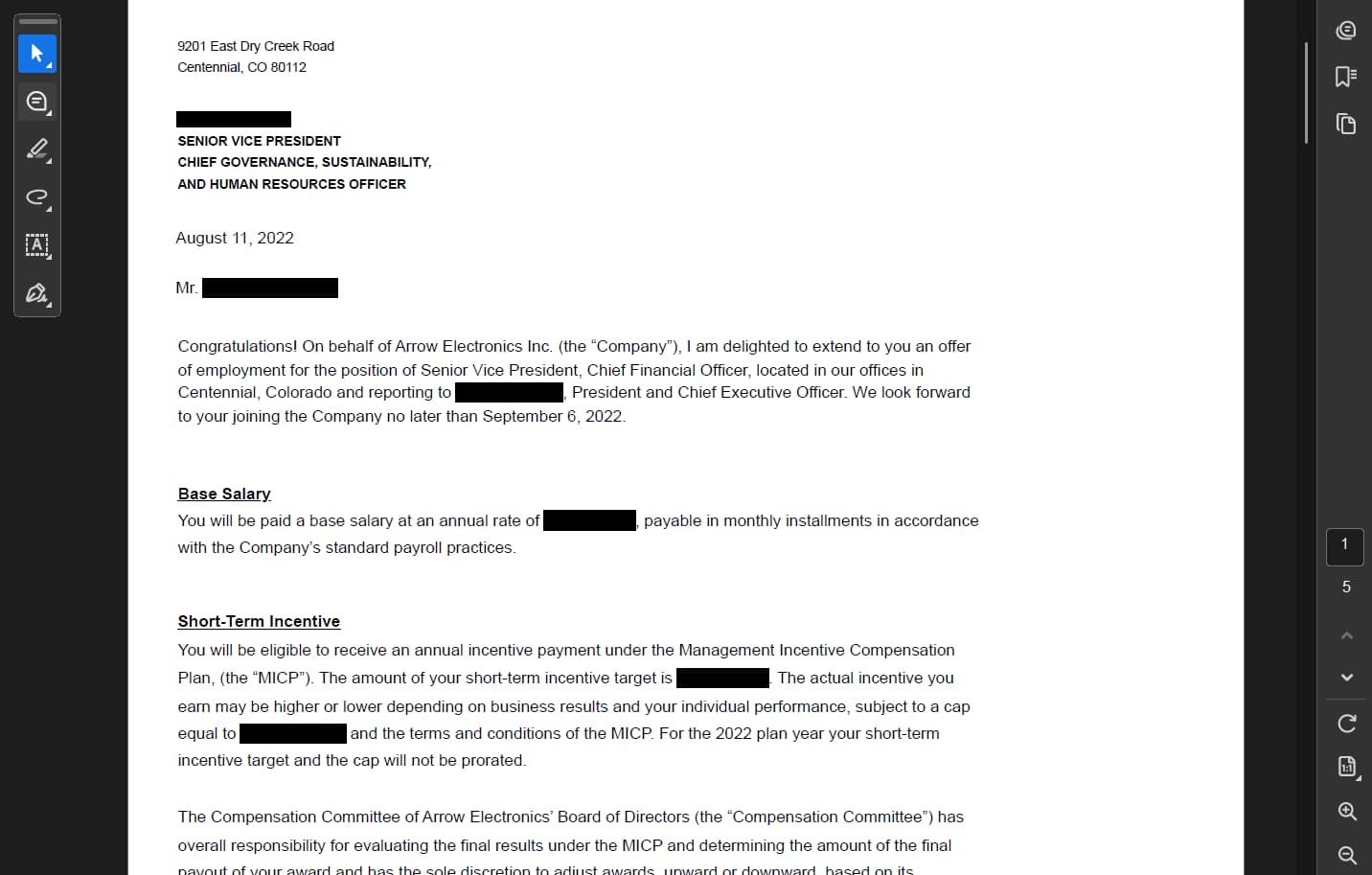
Many lawyers use PDF annotation tools to draw black boxes over sensitive text. This isn't redaction—it's hiding. The underlying text remains in the PDF and can be extracted with basic tools. True redaction permanently removes the data from the document.
It Doesn't Scale
When you're producing 10,000 pages for discovery, manual redaction isn't just impractical—it's impossible within reasonable timelines and budgets.
How AI-Powered Redaction Works
Modern AI redaction tools flip the process. Instead of you searching for every instance of sensitive information, AI finds it for you.
Natural Language Commands
Tell the AI what to redact in plain English:
- "Redact all phone numbers and email addresses"
- "Remove all personal information except the parties' names"
- "Redact SSNs, bank account numbers, and dates of birth"
The AI analyzes your entire document and finds every instance—including variations and formats you might miss manually.
Intelligent Detection
AI doesn't just look for patterns like "XXX-XX-XXXX" for Social Security numbers. It understands context:
- Names that appear in different formats throughout a document
- Addresses spanning multiple lines
- Phone numbers with various formatting
- Email addresses embedded in paragraphs
- Medical information requiring HIPAA protection
Preview Before You Commit
Unlike manual redaction where you hope you got everything, AI redaction shows you exactly what will be removed before you apply it:
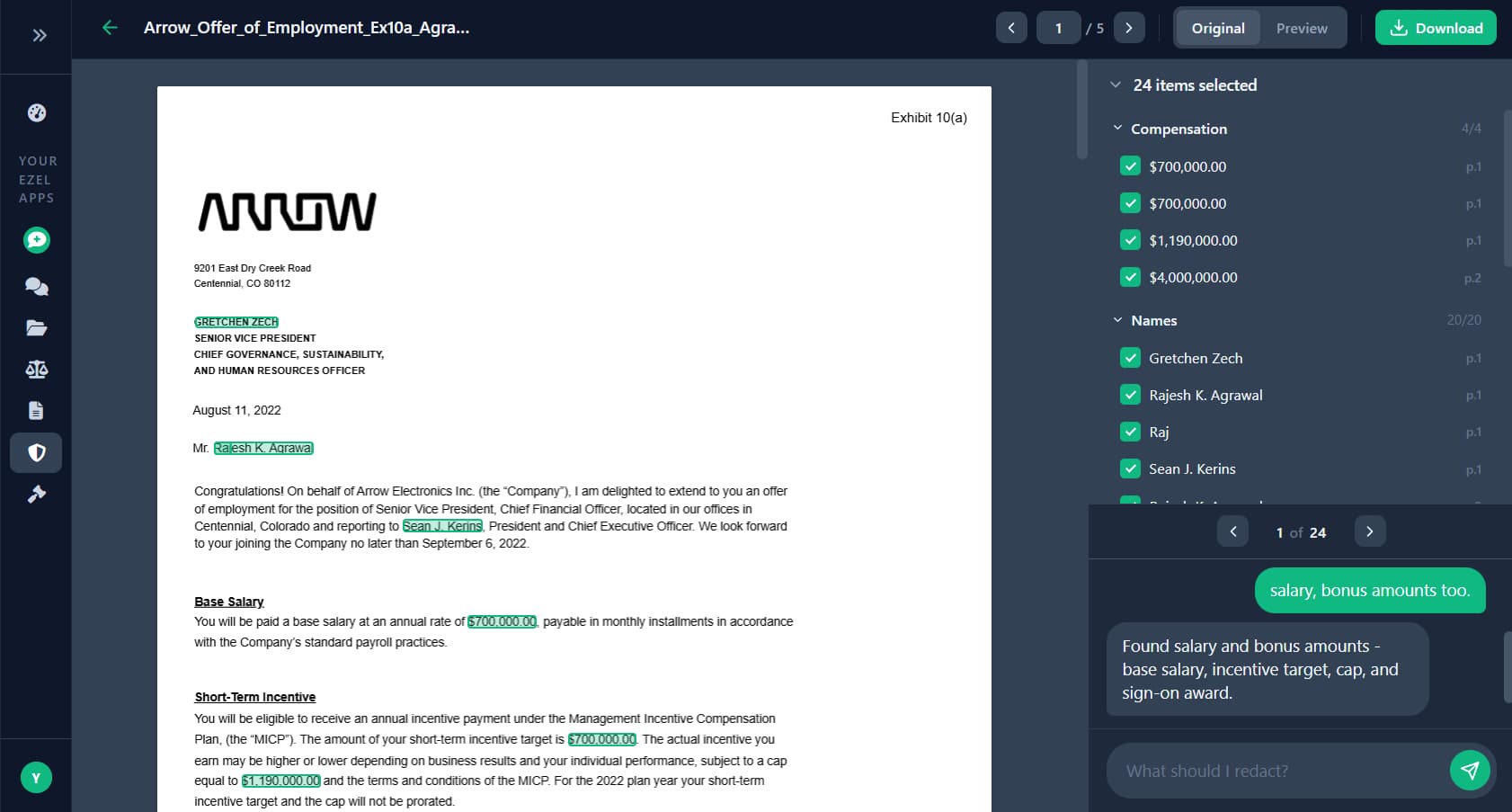
You see every finding, organized by category. Toggle items on or off with a click. Add more with a follow-up command. Only download when you're satisfied.
True Redaction
Quality AI tools perform actual redaction—permanently removing data from the PDF, not just covering it with a black box. The redacted document is safe to file, produce, or share.
What to Look for in AI Redaction Software
Not all redaction tools are created equal. Here's what matters for legal work:
Must-Have Features
- True redaction, not masking — Data must be permanently removed, not just hidden
- OCR capability — Must handle scanned documents, not just text-based PDFs
- Preview functionality — See what will be redacted before applying
- Category grouping — Organize findings by type (names, addresses, SSNs, etc.)
- Iterative refinement — Add or remove redactions without starting over
- Audit trail — Document what was redacted for compliance
Security Requirements
- End-to-end encryption for documents in transit and at rest
- No training on your client data
- Clear data retention and deletion policies
- SOC 2 compliance or equivalent
Questions to Ask Vendors
- Does your tool perform true redaction or just masking?
- How do you handle scanned/image-based PDFs?
- Is my data used to train your AI models?
- What's your process for handling confidential legal documents?
- Can I verify the redacted output before downloading?
Use Cases for Legal Professionals
Discovery Productions
The most common use case. When producing documents to opposing counsel:
- Redact privileged information from non-privileged documents
- Remove third-party PII unrelated to the matter
- Protect trade secrets while complying with discovery obligations
Before AI: Paralegals spend weeks reviewing documents page by page.
After AI: Upload the batch, describe what to redact, review the findings, download clean files.
FOIA and Public Records Requests
Government agencies and firms responding to public records requests must redact:
- Personal information of uninvolved parties
- Law enforcement sensitive information
- Exempt material under applicable statutes
AI handles the volume that makes FOIA compliance so burdensome.
Client File Sharing
When sharing case files with clients, experts, or co-counsel:
- Remove billing information from correspondence
- Redact other client names from shared templates
- Protect sensitive third-party information
Privilege Log Preparation
Creating privilege logs requires identifying privileged content and describing it without revealing protected information. AI can identify potentially privileged material and help prepare appropriate descriptions.
Court Filings
Many courts require redaction of:
- Social Security numbers (or all but last 4 digits)
- Financial account numbers
- Dates of birth
- Names of minor children
AI ensures consistent redaction across all filings.
The ROI of AI Redaction
Time Savings
| Document Volume | Manual Redaction | AI Redaction |
|---|---|---|
| 50 pages | 1-2 hours | 5 minutes |
| 500 pages | 1-2 days | 30 minutes |
| 5,000 pages | 2-3 weeks | 2-3 hours |
Cost Comparison
If a paralegal costs $75/hour and spends 20 hours redacting a discovery production:
- Manual cost: $1,500 in labor
- AI cost: $50-100 in software + 1 hour review = ~$175
- Savings: $1,325 per production
For firms handling multiple discovery matters monthly, annual savings reach five figures.
Risk Reduction
The cost of a missed redaction—sanctions, malpractice claims, client loss—dwarfs any software subscription. AI provides a second set of eyes that doesn't get tired or distracted.
Common Concerns
"Will AI miss things?"
AI redaction isn't perfect, but it's more consistent than human review. The best approach combines AI detection with human verification: let AI find everything, then review before applying. You catch what AI missed; AI catches what you would have missed.
"What about unusual document formats?"
Quality tools handle both text-based PDFs (where text can be selected) and scanned documents (images of text). For scanned documents, OCR extracts the text before AI analyzes it. Results are best with clear scans, but modern OCR handles most document quality.
"Is it secure for confidential documents?"
This is the right question to ask. Look for:
- Documents processed in isolated environments
- No data retention after processing
- No model training on your documents
- Encryption at rest and in transit
Enterprise-grade legal AI tools are built with confidentiality as a core requirement.
"What about my malpractice coverage?"
Using AI tools doesn't change your professional obligations. You must:
- Supervise the output
- Verify redactions are complete
- Apply independent judgment
Most malpractice carriers view AI as a tool like any other—acceptable when used with appropriate oversight.
Getting Started with AI Redaction
Step 1: Identify Your Highest-Volume Use Case
Where do you spend the most time redacting?
- Discovery productions
- FOIA responses
- Client file preparation
- Court filings
Start there for maximum impact.
Step 2: Test with Low-Stakes Documents
Before redacting a critical filing:
- Use internal documents to learn the tool
- Test with documents where you know what should be redacted
- Verify the output meets your standards
Step 3: Build It Into Your Workflow
Once comfortable:
- Make AI redaction the first step, not an afterthought
- Train staff on the tool
- Create checklists for different redaction scenarios
Step 4: Track Your Results
Measure:
- Time saved per document set
- Error rates (catches vs. misses)
- Client feedback on turnaround time
The Bottom Line
Manual redaction is a relic. It's slow, expensive, and risky. AI-powered redaction is faster, more accurate, and more secure.
The question isn't whether to adopt AI redaction—it's how quickly you can implement it before your competitors do.
Every hour your team spends manually blacking out phone numbers is an hour they're not spending on substantive legal work. Every missed SSN is a potential malpractice claim. Every delayed production strains the client relationship.
AI fixes this. Documents that took hours now take minutes. Accuracy goes up. Risk goes down. Your team focuses on legal work instead of tedious document processing.
Ready to stop redacting documents by hand? Try Ezel's AI-powered redaction and see why firms are switching from manual processes to intelligent document security.