
Small law firms face a familiar problem: clients expect BigLaw quality at small firm prices. You don't have a team of associates for research, a paralegal pool for document review, or an IT department to manage a stack of software subscriptions. You have yourself, maybe a few colleagues, and whatever tools you can afford.
The typical response is to cobble together a patchwork: Westlaw for research, Word for drafting, Adobe for redaction, Dropbox for storage, a spreadsheet for matter tracking. Each tool does one thing. None of them talk to each other. You spend half your day switching between tabs instead of practicing law.
There's a better approach: a single AI platform built for legal work that handles research, drafting, redlining, document management, and case organization in one place. Here's what that looks like in practice.
A Day Without AI vs. A Day With It
The Old Way: A Motion to Compel
It's Tuesday morning. Your client needs a motion to compel discovery responses. Here's your day:
9:00 AM — Log into Westlaw. Spend 45 minutes constructing Boolean queries for discovery abuse cases in your jurisdiction. Read through 30 results. Open 8 cases in separate tabs. Take notes on the relevant ones.
10:15 AM — Open Word. Start drafting from a motion you filed last year. Delete the old facts, rewrite the statement of the case, restructure the argument section. Realize the template you're working from used a different procedural posture.
12:00 PM — Still drafting. Copy citations from your Westlaw research into the brief. Manually format each one. Double-check that you haven't transposed any numbers.
1:30 PM — First draft done. Save as "Motion_to_Compel_v1_DRAFT.docx." Email to the partner for review.
3:00 PM — Partner sends back comments. Open the original, cross-reference their notes, manually enter changes.
4:30 PM — Need to send a redline to co-counsel showing changes from the last version they saw. Open both versions in Word, compare documents, clean up the formatting artifacts from Word's compare function.
5:30 PM — File the motion to your matter folder on Dropbox. Update your tracking spreadsheet. Save the research separately.
Total: a full day, spread across five tools.
The New Way: The Same Motion to Compel
9:00 AM — Open Ezel. Search the case law database: "cases where court granted motion to compel when responding party gave boilerplate objections to interrogatories in California." Get ranked results in seconds. Read the AI summaries, open the three strongest cases.
9:30 AM — Open the Document Editor. Type: "Draft a motion to compel discovery responses. The opposing party served boilerplate objections to our interrogatories without a privilege log. California state court, CCP 2030.300." Get a complete first draft in 30 seconds. It already includes the legal standard, proper citations, and a proposed order.
9:45 AM — Refine with the AI chat panel: "Add the three cases I just researched as supporting authority in the argument section. Strengthen the language about waiver of objections for failure to provide a privilege log." Watch the edits appear in real time.
10:15 AM — Review the draft yourself. Make a few manual tweaks to the facts section. Create a milestone: "Draft for Partner Review."
10:30 AM — Share with the partner inside Ezel. They make their edits. You see exactly what changed.
11:00 AM — Export a redline comparing the current version to what co-counsel last saw. Download as a .docx with real Word track changes. Send it.
11:15 AM — Assign the document, research, and conversation to the matter. Everything is organized and searchable.
Total: two hours, one tool. The rest of your day is yours.
What Actually Changes for Small Firms
The example above isn't hypothetical. It's the workflow difference when your tools are integrated instead of stitched together. Here's what each piece replaces.
Research: Replace Your $400/Month Database
Westlaw and Lexis are powerful, but their pricing assumes you're a 500-attorney firm. At $400+ per month, a solo practitioner is paying nearly $5,000 a year just to search for cases.
Ezel's case law search covers 2+ million court opinions across every federal and state jurisdiction. You search in plain English instead of Boolean operators. The AI ranks results by legal relevance and provides summaries so you can identify the right cases without reading every opinion.
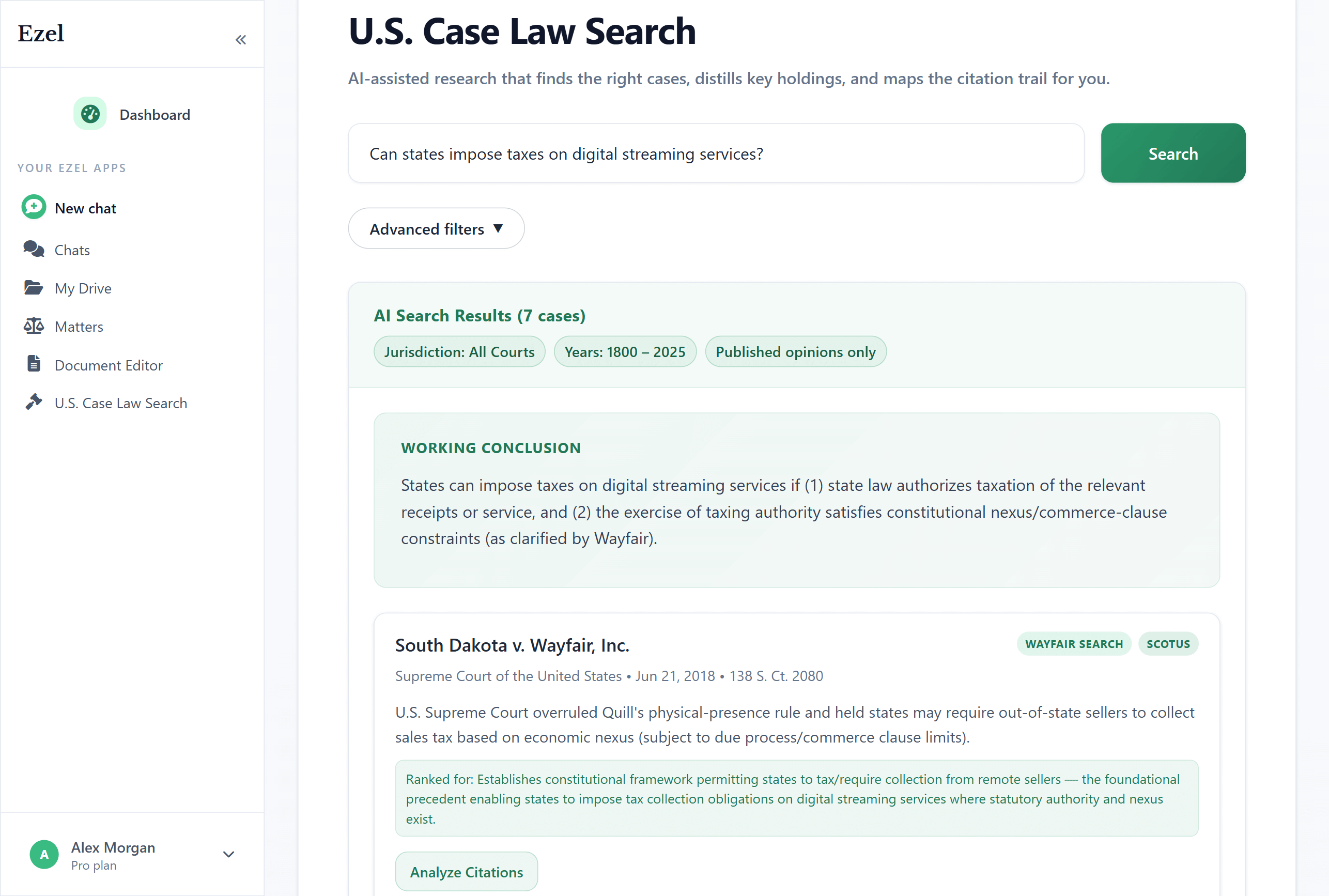
When you find what you need, the research stays connected to your matter. Six months later when the case goes to appeal, your original research is still there, organized and searchable.
Drafting: Stop Rewriting the Same Documents
Every small firm attorney has a folder of old documents they copy and modify for new matters. It works, but it's slow and error-prone. You forget to change a party name, miss an outdated clause, or spend an hour reformatting.
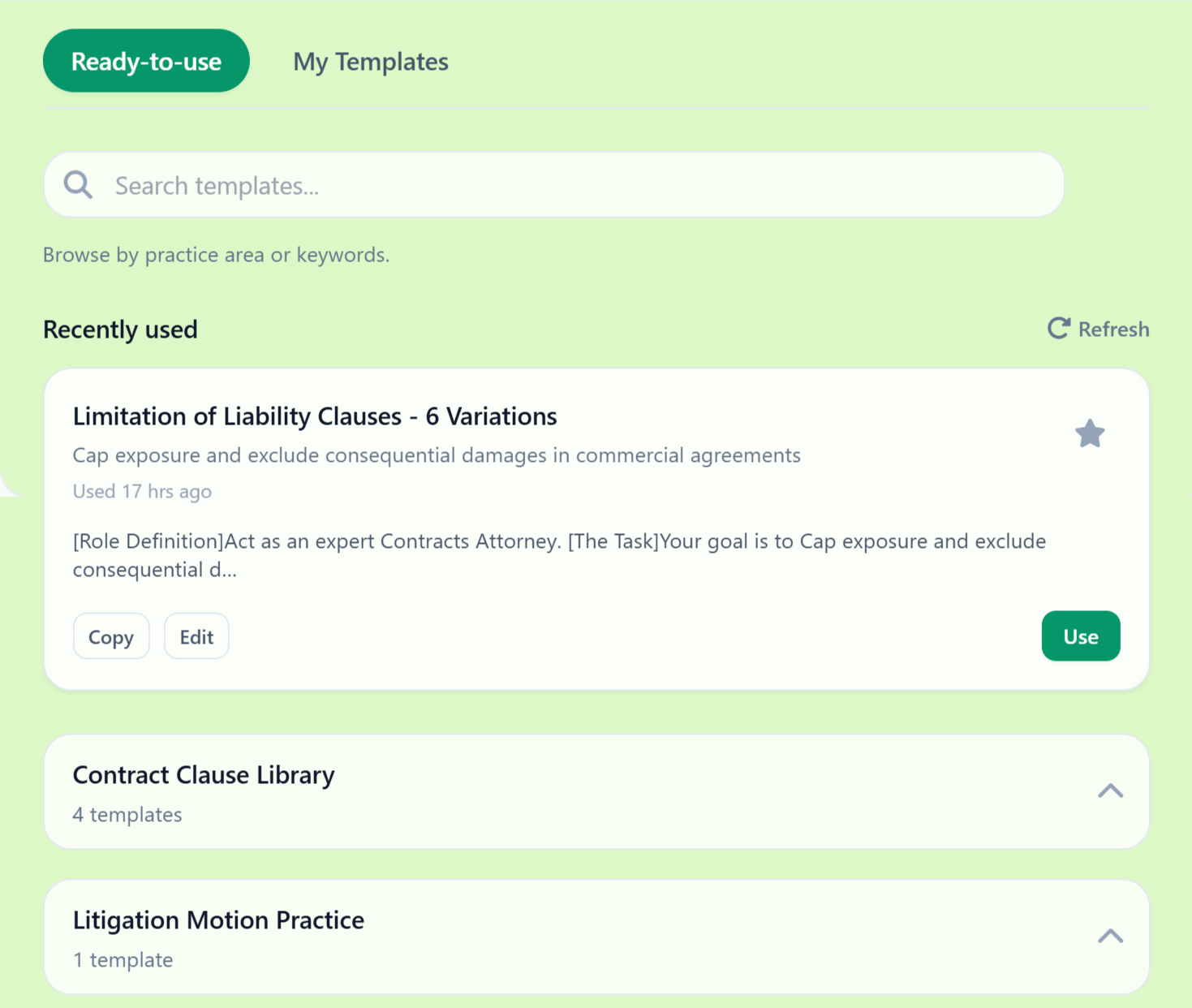
Ezel's Document Editor starts with over 54 template categories covering everything from NDAs to employment agreements to real estate contracts to litigation filings. But these aren't static forms. Tell the AI what you need, and it generates a complete document customized to your jurisdiction, your client's situation, and your firm's preferences.
Your firm name, your preferred governing law clause, your standard liability caps, your notice provisions — set them once in your profile, and every document includes them automatically.
Redlining: Send Real Track Changes
This is the feature that changes daily workflow the most. When you negotiate a contract, opposing counsel expects Word documents with track changes. Most AI tools can't produce this. They generate clean text or PDFs, and you're stuck manually entering changes in Word.
Ezel exports real .docx files with actual Word track changes. Your name appears as the author. The formatting is clean. Opposing counsel opens it in Word and sees exactly what they expect. They'll never know AI was involved unless you tell them.
The workflow: save a milestone before your edits, make your changes (manually or with AI help), export the redline. Three steps instead of an hour in Word.
Matter Management: Stop Using Spreadsheets
Every conversation, document, research session, and file related to a client or case lives in one place. Create a matter, and everything you do for that client is automatically organized: the AI chats where you analyzed their contract, the documents you drafted, the cases you researched, the files they sent you.
No more hunting through email for that attachment. No more wondering which version of the agreement is current. No more spreadsheets tracking what you've done for each client.
Secure Storage: Stop Emailing Sensitive Files
Client documents belong in encrypted storage, not email attachments and consumer-grade cloud drives. Ezel's Drive provides secure document storage with time-limited sharing links, password protection, and access controls.
For firms with strict data governance requirements, Bring Your Own Storage (BYOS) lets you connect your own AWS S3 buckets. Your data stays in your infrastructure while Ezel provides the interface and AI capabilities.
The Math for a Small Firm
Forget vague ROI projections. Here's the concrete comparison.
What you're paying now (typical solo/small firm):
| Tool | Monthly Cost |
|---|---|
| Westlaw or Lexis | $400+ |
| Microsoft 365 | $20 |
| Cloud storage (Dropbox/Google) | $15 |
| Adobe Acrobat (for redaction) | $25 |
| Practice management software | $50-100 |
| Total | $510-560+ |
And these tools don't talk to each other. Your research lives in one place, your documents in another, your files somewhere else.
What you'd pay with Ezel:
| Tool | Monthly Cost |
|---|---|
| Ezel (research, drafting, redlining, storage, matters, redaction) | $249 |
| Microsoft 365 (for final delivery) | $20 |
| Total | $269 |
You save money and gain an integrated workflow. The real savings, though, aren't in subscription costs. They're in time.
If Ezel saves you 10 hours a month — a conservative estimate based on faster research and drafting alone — that's 10 hours you can bill, use for client development, or spend away from the office. At $300/hour, that's $3,000 in recovered capacity. Every month.
What This Doesn't Replace
Ezel isn't practice management software. It doesn't handle billing, calendaring, or client intake. If you use Clio, MyCase, or PracticePanther for those functions, keep using them. Ezel replaces the substantive legal work tools: research, drafting, document management, and redaction.
It also doesn't replace your judgment. Every document needs your review. Every citation needs verification. Every strategic decision is yours. AI handles the repetitive work so you can focus on the parts that require a lawyer.
Not Ready for a Subscription?
If you just need a single document — one contract, one agreement, one motion — Ezel offers a $49 one-time purchase. Pick any template, customize it with AI, edit for 3 days, and download as Word or PDF. No subscription required. It's a low-risk way to see what AI-assisted drafting actually looks like before committing.
Getting Started
- Get started with Ezel. Open the platform and the eight apps.
- Bring a real matter. Upload a document you're working on, run a search you'd normally do on Westlaw, or draft something you have on your desk.
- Compare the experience. Time yourself. See how the integrated workflow compares to your current process.
The small firms that pull ahead in the next few years won't be the ones with the most associates or the biggest budgets. They'll be the ones that use better tools to deliver faster, higher-quality work. The technology gap between solo practitioners and BigLaw is closing. The firms that act on it first will benefit the most.
Ready to replace five tools with one? Try Ezel and see what an integrated AI legal workspace can do for your practice.