HIPAA SECURITY INCIDENT RESPONSE PLAN
Organization Name: [________________________________]
Plan Version: [____]
Effective Date: [__/__/____]
Last Reviewed: [__/__/____]
Plan Owner: [________________________________] (Security Officer)
Classification: Confidential — Internal Use Only
SECTION 1: PURPOSE AND SCOPE
1.1 Purpose
This Security Incident Response Plan ("SIRP" or "Plan") establishes a comprehensive framework for identifying, containing, eradicating, recovering from, and documenting security incidents affecting electronic protected health information ("ePHI") and other information assets. This Plan fulfills the requirements of the HIPAA Security Rule at 45 C.F.R. § 164.308(a)(6)(i), which requires covered entities and business associates to implement policies and procedures to address security incidents, and aligns with the NIST Cybersecurity Framework 2.0 (Govern, Identify, Protect, Detect, Respond, Recover).
1.2 Scope
This Plan applies to:
- All workforce members (employees, volunteers, trainees, contractors) of [________________________________] ("Organization")
- All systems, networks, applications, and media that create, receive, maintain, or transmit ePHI
- All physical locations where ePHI is accessed or stored
- All business associates and subcontractors with access to Organization ePHI
- Both on-premises and cloud-based systems containing ePHI
1.3 Regulatory Framework
This Plan is developed in compliance with and references the following authorities:
| Authority | Description |
|---|---|
| 45 C.F.R. § 164.308(a)(6) | Security incident procedures (Administrative Safeguard) |
| 45 C.F.R. § 164.308(a)(1) | Security management process / risk analysis |
| 45 C.F.R. §§ 164.400-414 | Breach Notification Rule |
| 45 C.F.R. § 164.312(b) | Audit controls |
| 45 C.F.R. § 164.530(j) | 6-year documentation retention |
| NIST SP 800-61r3 | Computer Security Incident Handling Guide |
| NIST SP 800-66r2 | Implementing the HIPAA Security Rule |
| NIST CSF 2.0 | Cybersecurity Framework (2024) |
SECTION 2: DEFINITIONS
Security Incident: The attempted or successful unauthorized access, use, disclosure, modification, or destruction of information or interference with system operations in an information system. (45 C.F.R. § 164.304)
Breach: The acquisition, access, use, or disclosure of PHI in a manner not permitted under the HIPAA Privacy Rule which compromises the security or privacy of the PHI. (45 C.F.R. § 164.402)
Unsecured PHI: PHI that is not rendered unusable, unreadable, or indecipherable to unauthorized persons through the use of encryption or destruction methodologies specified by the Secretary. (45 C.F.R. § 164.402)
ePHI: Electronic protected health information created, received, maintained, or transmitted by the Organization.
Covered Entity: A health plan, healthcare clearinghouse, or healthcare provider that transmits health information electronically.
Business Associate: A person or entity that performs functions or activities on behalf of a covered entity that involve the use or disclosure of PHI.
Incident Response Team ("IRT"): The designated group of individuals responsible for coordinating the Organization's response to security incidents.
Forensic Image: A bit-for-bit copy of digital media used for evidentiary analysis.
Indicators of Compromise ("IOC"): Technical artifacts or observable behaviors that suggest a security incident has occurred or is occurring.
SECTION 3: INCIDENT RESPONSE TEAM STRUCTURE
3.1 IRT Composition
| Role | Name | Contact | Backup |
|---|---|---|---|
| IRT Lead / Security Officer | [________________] | [________________] | [________________] |
| Privacy Officer | [________________] | [________________] | [________________] |
| Legal Counsel | [________________] | [________________] | [________________] |
| IT Director / CISO | [________________] | [________________] | [________________] |
| Network/Systems Administrator | [________________] | [________________] | [________________] |
| Human Resources Representative | [________________] | [________________] | [________________] |
| Communications / Public Relations | [________________] | [________________] | [________________] |
| Compliance Officer | [________________] | [________________] | [________________] |
| Department Manager(s) Affected | [________________] | [________________] | [________________] |
| External Forensics Vendor | [________________] | [________________] | [________________] |
3.2 Role Responsibilities
IRT Lead / Security Officer:
- Serves as overall incident commander
- Activates IRT and assigns responsibilities
- Makes containment and eradication decisions
- Coordinates with external parties (law enforcement, forensics vendors, cyber insurance carrier)
- Ensures documentation and evidence preservation
- Conducts post-incident review
Privacy Officer:
- Determines whether a breach of PHI has occurred
- Conducts or oversees the four-factor risk assessment under 45 C.F.R. § 164.402(2)
- Coordinates breach notification to individuals, HHS, and media as required
- Cross-references the Organization's HIPAA Breach Response Plan
- Ensures individual rights and privacy protections during investigation
Legal Counsel:
- Advises on legal obligations (federal and state breach notification laws)
- Asserts attorney-client privilege over investigation work product where appropriate
- Coordinates with law enforcement regarding potential criminal activity
- Reviews all external communications and breach notification letters
- Advises on regulatory reporting obligations (OCR, state AGs)
IT Director / CISO:
- Leads technical investigation and forensic analysis
- Implements containment and eradication measures
- Coordinates system recovery and validation
- Manages external forensics vendor engagement
- Preserves and analyzes system logs, network traffic, and forensic images
Human Resources Representative:
- Addresses incidents involving workforce members
- Coordinates disciplinary actions for policy violations
- Supports workforce interview processes
- Manages workforce notification and training needs
Communications / Public Relations:
- Drafts external communications, press releases, and media responses
- Manages media inquiries (see HIPAA Breach Notification — Media template)
- Coordinates internal workforce communications
- Monitors social media and public reporting
3.3 External Resources (Pre-Contracted)
| Resource | Vendor / Contact | Contract # | Retainer? |
|---|---|---|---|
| Digital Forensics Firm | [________________] | [________] | ☐ Yes ☐ No |
| Cyber Insurance Carrier | [________________] | [________] | Policy #: [________] |
| Breach Notification Vendor | [________________] | [________] | ☐ Yes ☐ No |
| Credit Monitoring Provider | [________________] | [________] | ☐ Yes ☐ No |
| Outside Legal Counsel | [________________] | [________] | ☐ Yes ☐ No |
| Law Enforcement Liaison | [________________] | [________] | N/A |
SECTION 4: INCIDENT CLASSIFICATION
4.1 Incident Severity Levels
Level 1 — Critical (Emergency Response Required)
- Active ransomware attack encrypting ePHI systems
- Confirmed large-scale exfiltration of ePHI (500+ individuals)
- Complete loss of access to critical ePHI systems
- Nation-state or advanced persistent threat (APT) intrusion confirmed
- Response Time: Immediate (within 1 hour)
- IRT Activation: Full team plus executive leadership
- External Notification: Cyber insurance carrier within policy-required timeframe
Level 2 — High (Urgent Response Required)
- Unauthorized access to ePHI by external threat actor (scope being determined)
- Confirmed malware infection on systems containing ePHI
- Business associate reports breach affecting Organization's ePHI
- Theft or loss of unencrypted device containing ePHI
- Response Time: Within 4 hours
- IRT Activation: Core team (Security Officer, Privacy Officer, IT, Legal)
- External Notification: Cyber insurance carrier as appropriate
Level 3 — Medium (Prompt Response Required)
- Unauthorized internal access to ePHI (e.g., employee snooping)
- Misdirected fax, email, or mail containing PHI
- Phishing attack with potential credential compromise (no confirmed ePHI access)
- Vulnerability identified that could expose ePHI if exploited
- Response Time: Within 24 hours
- IRT Activation: Security Officer, Privacy Officer, IT
- External Notification: As determined by investigation
Level 4 — Low (Routine Response)
- Failed login attempts or port scanning without system compromise
- Spam or phishing email detected and blocked before user interaction
- Minor policy violation with no ePHI exposure
- System anomaly requiring investigation but no confirmed incident
- Response Time: Within 72 hours
- IRT Activation: Security Officer, IT
- External Notification: Generally not required
4.2 Escalation Criteria
Incidents shall be escalated to a higher severity level when:
☐ Additional systems are discovered to be compromised
☐ The number of affected individuals increases significantly
☐ ePHI exfiltration is confirmed or strongly suspected
☐ Media attention or public awareness occurs
☐ Law enforcement involvement is initiated
☐ Threat actor demonstrates persistence or escalation
☐ Business continuity is threatened
SECTION 5: DETECTION AND ANALYSIS
5.1 Detection Sources
The Organization monitors the following detection sources for indicators of security incidents:
Technical Detection:
☐ Intrusion Detection/Prevention System (IDS/IPS) alerts
☐ Security Information and Event Management (SIEM) system
☐ Endpoint Detection and Response (EDR) alerts
☐ Firewall and network traffic analysis
☐ Data Loss Prevention (DLP) alerts
☐ Email security gateway alerts (phishing, malware)
☐ Antivirus/anti-malware alerts
☐ Cloud access security broker (CASB) alerts
☐ Vulnerability scanning results
☐ EHR/application audit log anomalies
Human Detection:
☐ Workforce member reports (internal hotline, email, ticketing system)
☐ Business associate notifications (per BAA requirements)
☐ Patient/individual complaints
☐ Help desk tickets indicating suspicious activity
☐ Physical security reports (unauthorized facility access)
External Detection:
☐ Law enforcement notifications
☐ HHS/OCR notifications
☐ Threat intelligence feeds and advisories (HHS HC3, CISA)
☐ Media reports or public disclosures
☐ Third-party security researcher reports
5.2 Incident Reporting Channels
All workforce members must report suspected security incidents immediately through any of the following channels:
| Channel | Details |
|---|---|
| Security Incident Hotline | [________________________________] |
| [________________________________] | |
| IT Ticketing System | [________________________________] |
| In Person | Report to immediate supervisor or Security Officer |
| Anonymous Reporting | [________________________________] |
Reporting Obligation: Under HIPAA, all workforce members are required to report suspected security incidents. Failure to report is a policy violation subject to disciplinary action, up to and including termination. (See 45 C.F.R. § 164.308(a)(6)(ii) — Response and Reporting)
5.3 Initial Analysis Procedures
Upon receiving an incident report, the IRT Lead or designee shall:
- Triage — Assign initial severity level based on available information
- Validate — Confirm whether a security incident has occurred (vs. false positive)
- Scope — Determine initial scope of affected systems, data, and users
- Classify — Determine incident type:
☐ Hacking / IT incident (external intrusion, malware, ransomware)
☐ Unauthorized access/disclosure (internal workforce, business associate)
☐ Theft (device, media, records)
☐ Loss (device, media, records)
☐ Improper disposal (paper, electronic media)
☐ Other: [________________________________] - Document — Create incident record with unique tracking number
- Notify — Alert appropriate IRT members based on severity level
SECTION 6: CONTAINMENT
6.1 Short-Term Containment (Immediate — Stop the Bleeding)
The goal of short-term containment is to limit the immediate damage and prevent further unauthorized access while preserving evidence.
☐ Isolate affected systems from the network (do NOT power off — preserve volatile data)
☐ Block suspicious IP addresses, domains, or user accounts at the perimeter
☐ Disable compromised user credentials and reset passwords
☐ Redirect network traffic as needed to maintain operations
☐ Enable enhanced logging on affected and adjacent systems
☐ Implement temporary firewall rules to restrict lateral movement
☐ Quarantine affected email accounts if phishing/BEC is involved
☐ Preserve system state (memory dumps, running processes) before any changes
☐ Notify cyber insurance carrier per policy requirements (typically within 24-72 hours)
6.2 Long-Term Containment (Sustained — Prepare for Eradication)
☐ Move affected systems to a contained network segment (VLAN isolation)
☐ Deploy clean replacement systems for critical business operations
☐ Implement additional monitoring on all systems with similar configurations
☐ Conduct enterprise-wide credential reset if credential compromise is widespread
☐ Patch known vulnerabilities that were exploited
☐ Review and restrict business associate remote access
☐ Engage external forensics vendor if internal capabilities are insufficient
☐ Implement additional access controls on ePHI repositories
☐ Review backup integrity (confirm backups are not also compromised)
6.3 Containment Decision Authority
| Severity Level | Containment Authority | Approval Required for System Shutdown |
|---|---|---|
| Level 1 — Critical | IRT Lead / CISO | IRT Lead (immediate authority) |
| Level 2 — High | IRT Lead / IT Director | IRT Lead |
| Level 3 — Medium | IT Director | Security Officer |
| Level 4 — Low | IT Staff | IT Director |
SECTION 7: EVIDENCE PRESERVATION AND FORENSIC ANALYSIS
7.1 Evidence Preservation Requirements
All evidence must be preserved in a manner that maintains its integrity and admissibility. The Organization shall maintain a chain of custody for all evidence collected.
Digital Evidence Preservation Checklist:
☐ Create forensic images (bit-for-bit copies) of affected systems before any remediation
☐ Capture volatile data (RAM, running processes, network connections, logged-in users)
☐ Preserve all relevant log files (system, application, network, authentication, audit)
☐ Document hash values (SHA-256) of all forensic images and evidence
☐ Store evidence in a secure, access-controlled location
☐ Maintain chain of custody log for all evidence items
☐ Preserve email communications related to the incident
☐ Capture screenshots of anomalous activity or indicators of compromise
☐ Retain firewall, IDS/IPS, and SIEM logs for the relevant timeframe
☐ Preserve physical evidence (stolen devices, access cards, paper records) in sealed containers
7.2 Chain of Custody Documentation
| Item # | Description | Collected By | Date/Time | Location | Hash Value |
|---|---|---|---|---|---|
| [____] | [________________________________] | [________] | [__/__/____] | [________] | [________________] |
| [____] | [________________________________] | [________] | [__/__/____] | [________] | [________________] |
| [____] | [________________________________] | [________] | [__/__/____] | [________] | [________________] |
7.3 Forensic Analysis Procedures
☐ Analyze forensic images to determine attack vector and timeline
☐ Review authentication logs to identify unauthorized access
☐ Examine network traffic for data exfiltration indicators
☐ Analyze malware samples in a sandbox environment
☐ Correlate findings across multiple data sources
☐ Determine scope of ePHI accessed, acquired, or exfiltrated
☐ Identify all affected individuals (for breach notification purposes)
☐ Document forensic findings in a written report
SECTION 8: ERADICATION AND RECOVERY
8.1 Eradication Procedures
☐ Remove malware, backdoors, and unauthorized accounts from all affected systems
☐ Patch or remediate the vulnerability that was exploited
☐ Rebuild compromised systems from known-good baselines or clean media
☐ Reset all potentially compromised credentials (local and domain accounts)
☐ Revoke and reissue certificates if certificate compromise is suspected
☐ Update firewall rules, IDS/IPS signatures, and endpoint protection
☐ Scan all systems with updated anti-malware tools
☐ Verify eradication through re-scanning and log review
☐ Close unauthorized remote access points
8.2 Recovery Procedures
☐ Restore affected systems from validated clean backups
☐ Verify data integrity post-restoration
☐ Implement enhanced monitoring on restored systems for [30/60/90] days
☐ Gradually return systems to production with increased logging
☐ Validate that all business processes function correctly
☐ Test ePHI access controls and verify appropriate restrictions
☐ Confirm EHR and clinical system integrity
☐ Update system documentation to reflect changes made during recovery
☐ Monitor for recurrence of indicators of compromise
8.3 Recovery Priorities
| Priority | System / Function | RPO | RTO |
|---|---|---|---|
| 1 | [________________________________] | [____] | [____] |
| 2 | [________________________________] | [____] | [____] |
| 3 | [________________________________] | [____] | [____] |
| 4 | [________________________________] | [____] | [____] |
RPO = Recovery Point Objective; RTO = Recovery Time Objective
SECTION 9: RANSOMWARE-SPECIFIC RESPONSE PROCEDURES
9.1 Ransomware Response Protocol
Per OCR guidance, ransomware incidents affecting ePHI are presumed to be breaches requiring notification unless the covered entity can demonstrate a low probability that the PHI was compromised. OCR has clarified that when ePHI is encrypted by ransomware, it constitutes an unauthorized acquisition of PHI because the attacker took control of the data, even if the data was not exfiltrated.
Immediate Actions:
☐ Isolate affected systems immediately — disconnect from network but do NOT power off
☐ Do NOT pay ransom without legal counsel and law enforcement consultation
☐ Preserve ransom note (screenshot) and all related communications
☐ Contact cyber insurance carrier immediately (most policies have specific ransomware provisions)
☐ Contact FBI (IC3 at ic3.gov) and/or local FBI field office
☐ Contact CISA (cisa.gov/report) for technical assistance
☐ Determine if data was exfiltrated (double extortion) or only encrypted
9.2 Ransomware Breach Analysis
| Factor | Analysis |
|---|---|
| Was ePHI encrypted by the ransomware? | ☐ Yes ☐ No ☐ Unknown |
| Was ePHI exfiltrated prior to encryption? | ☐ Yes ☐ No ☐ Unknown |
| Was the ePHI encrypted (per HIPAA standards) before the ransomware attack? | ☐ Yes ☐ No |
| Was the encryption key also compromised? | ☐ Yes ☐ No ☐ Unknown |
| Can the Organization demonstrate low probability of compromise? | ☐ Yes ☐ No |
OCR Position: If ePHI was encrypted consistent with NIST standards prior to the ransomware attack and the encryption key was not compromised, the encryption safe harbor under 45 C.F.R. § 164.402(2) may apply, and the incident may not constitute a breach. However, if the attacker also exfiltrated the data, the safe harbor does not apply to the exfiltrated copy.
9.3 Ransom Payment Considerations
Legal counsel must be consulted before any ransom payment decision. Factors include:
☐ OFAC sanctions screening (payment to sanctioned entities may violate federal law)
☐ Cyber insurance coverage and carrier approval requirements
☐ Law enforcement recommendations
☐ Availability and integrity of backup systems
☐ Impact on patient safety and care delivery
☐ No guarantee that payment will result in decryption or prevent data publication
SECTION 10: COMMUNICATION PLAN
10.1 Internal Communications
| Audience | Responsible Party | Timing | Method |
|---|---|---|---|
| Executive Leadership | IRT Lead | Within 2 hours of Level 1-2 | Phone / In-person |
| Board of Directors | Executive Leadership | Within 24 hours of Level 1 | Secure briefing |
| Affected Department(s) | Department Manager | As directed by IRT Lead | In-person meeting |
| All Workforce Members | HR / Communications | As directed by IRT Lead | Secure email / intranet |
10.2 External Communications
| Audience | Responsible Party | Timing | Method |
|---|---|---|---|
| Cyber Insurance Carrier | IRT Lead / Legal | Per policy (typically 24-72 hrs) | Phone + written notice |
| Law Enforcement (FBI, local) | IRT Lead / Legal | As warranted | Phone / IC3 report |
| HHS/OCR | Privacy Officer | Per Breach Notification Rule | HHS Breach Portal |
| Affected Individuals | Privacy Officer | Within 60 days of discovery | Written notice |
| Media (if >500 in state) | Communications | Within 60 days of discovery | Press release |
| State Attorneys General | Legal Counsel | Per state law requirements | Written notice |
| Business Associates | Privacy Officer | As needed for coordination | Written notice |
10.3 Law Enforcement Coordination
☐ Determine whether law enforcement notification is warranted
☐ Coordinate with legal counsel before contacting law enforcement
☐ If law enforcement requests a delay in breach notification under 45 C.F.R. § 164.412, obtain written request and document the delay period
☐ A law enforcement delay does not extend the 60-day notification clock permanently — notification must occur upon conclusion of the delay
☐ Report cybercrime to FBI's Internet Crime Complaint Center (IC3) at ic3.gov
☐ Report ransomware and critical incidents to CISA at cisa.gov/report
SECTION 11: BUSINESS ASSOCIATE INCIDENT COORDINATION
11.1 Business Associate Obligations
Under 45 C.F.R. § 164.410, business associates must notify covered entities of breaches of unsecured PHI without unreasonable delay and no later than 60 days after discovery (or sooner if the BAA specifies a shorter timeframe).
11.2 BAA Incident Reporting Requirements
☐ Review all Business Associate Agreements for incident reporting timeframes
☐ Maintain current contact information for all BAs with ePHI access
☐ Document BA-reported incidents using the same tracking system
☐ Verify BA's containment and remediation actions
☐ Obtain BA's forensic investigation report
☐ Determine whether the Organization (as covered entity) has independent notification obligations
☐ Coordinate notification timing with the BA
11.3 Business Associate Contact Registry
| Business Associate | Service | ePHI Access | Incident Contact | BAA Reporting Period |
|---|---|---|---|---|
| [________________] | [________________] | [________________] | [________________] | [____] days |
| [________________] | [________________] | [________________] | [________________] | [____] days |
| [________________] | [________________] | [________________] | [________________] | [____] days |
SECTION 12: BREACH NOTIFICATION INTEGRATION
12.1 Transition to Breach Response
When a security incident involves potential unauthorized access, use, or disclosure of unsecured PHI, the IRT Lead shall:
- Notify the Privacy Officer immediately
- Initiate the HIPAA Breach Risk Assessment Worksheet (four-factor analysis per 45 C.F.R. § 164.402(2))
- If breach is confirmed (or cannot be demonstrated to be low probability of compromise), activate the HIPAA Breach Response Plan
- Coordinate individual, HHS, and media notifications as required
- Maintain parallel documentation for both the security incident and breach response
12.2 Cross-Reference to Related Templates
This Security Incident Response Plan works in conjunction with the following Organization documents:
- HIPAA Breach Response Plan — Comprehensive breach response procedures
- HIPAA Breach Risk Assessment Worksheet — Four-factor risk assessment documentation
- HIPAA Breach Notification — HHS — HHS breach portal submission guide
- HIPAA Breach Notification — Media — Media notification and press release template
- HIPAA Breach Notification Call Script — Individual notification call procedures
SECTION 13: POST-INCIDENT REVIEW AND LESSONS LEARNED
13.1 Post-Incident Review Meeting
A post-incident review ("lessons learned") meeting shall be conducted within [____] days of incident closure. All IRT members who participated in the response shall attend.
Meeting Agenda:
☐ Incident timeline reconstruction (from detection through recovery)
☐ What worked well in the response
☐ What could be improved
☐ Root cause analysis
☐ Effectiveness of detection mechanisms
☐ Timeliness and adequacy of containment
☐ Communication effectiveness (internal and external)
☐ Documentation completeness
☐ Policy and procedure gaps identified
☐ Recommended corrective actions and responsible parties
☐ Training needs identified
13.2 Post-Incident Report
The IRT Lead shall prepare a written Post-Incident Report within [____] days of the review meeting, documenting:
- Executive summary
- Complete incident timeline
- Root cause analysis
- Impact assessment (systems, data, individuals affected)
- Response actions taken and their effectiveness
- Breach determination (if applicable) and notification actions
- Corrective actions recommended with implementation deadlines
- Resource requirements for remediation
- Lessons learned
13.3 Corrective Action Tracking
| Action Item | Owner | Deadline | Status |
|---|---|---|---|
| [________________________________] | [________________] | [__/__/____] | ☐ Open ☐ In Progress ☐ Complete |
| [________________________________] | [________________] | [__/__/____] | ☐ Open ☐ In Progress ☐ Complete |
| [________________________________] | [________________] | [__/__/____] | ☐ Open ☐ In Progress ☐ Complete |
| [________________________________] | [________________] | [__/__/____] | ☐ Open ☐ In Progress ☐ Complete |
SECTION 14: TESTING AND EXERCISES
14.1 Exercise Schedule
The Organization shall conduct regular exercises to test this Plan and ensure readiness:
| Exercise Type | Frequency | Description | Participants |
|---|---|---|---|
| Tabletop Exercise | Annually (minimum) | Discussion-based walkthrough of incident scenarios | Full IRT |
| Functional Exercise | Every 2 years | Hands-on simulation with technical response actions | IT, Security, Privacy |
| Full-Scale Exercise | Every 3 years | Comprehensive simulation including external parties | IRT + external vendors |
| Phishing Simulation | Quarterly | Simulated phishing campaigns to test workforce awareness | All workforce |
| Backup Restoration Test | Semi-annually | Validate ability to restore ePHI from backups | IT |
14.2 Tabletop Exercise Scenarios
The following scenarios should be included in the exercise rotation:
☐ Ransomware attack encrypting EHR system and demanding payment
☐ Business associate data breach affecting Organization's patients
☐ Insider threat — workforce member accessing celebrity/VIP patient records
☐ Lost/stolen unencrypted laptop containing ePHI
☐ Phishing attack leading to credential compromise and ePHI access
☐ Physical break-in with theft of paper records and computer equipment
☐ Misdirected email containing ePHI sent to large distribution list
☐ Third-party vendor vulnerability exploited (supply chain attack)
14.3 Exercise Documentation
Each exercise shall be documented, including:
☐ Date, time, and duration
☐ Participants and roles
☐ Scenario description
☐ Observations and findings
☐ Action items for improvement
☐ Plan updates resulting from the exercise
SECTION 15: DOCUMENTATION AND RETENTION
15.1 Documentation Requirements
The following documentation must be created and retained for each security incident:
☐ Initial incident report (who, what, when, where, how discovered)
☐ Incident tracking log with status updates
☐ IRT activation records and communications
☐ Forensic analysis reports
☐ Evidence inventory and chain of custody logs
☐ Containment and eradication action logs
☐ Recovery and validation records
☐ Breach risk assessment worksheet (if PHI involved)
☐ Notification records (individuals, HHS, media, state AGs)
☐ Post-incident review report
☐ Corrective action plans and completion records
15.2 Retention Requirements
Per 45 C.F.R. § 164.530(j), all documentation related to HIPAA compliance, including incident response documentation, must be retained for a minimum of six (6) years from the date of creation or the date when it was last in effect, whichever is later.
Note: State law, litigation hold obligations, and cyber insurance policy terms may require longer retention. Consult legal counsel regarding applicable retention requirements.
15.3 Incident Log
| Incident # | Date Discovered | Classification | PHI Involved? | Breach? | Status | Closed Date |
|---|---|---|---|---|---|---|
| [________] | [__/__/____] | Level [____] | ☐ Yes ☐ No | ☐ Yes ☐ No | [________] | [__/__/____] |
| [________] | [__/__/____] | Level [____] | ☐ Yes ☐ No | ☐ Yes ☐ No | [________] | [__/__/____] |
| [________] | [__/__/____] | Level [____] | ☐ Yes ☐ No | ☐ Yes ☐ No | [________] | [__/__/____] |
SECTION 16: CYBER INSURANCE NOTIFICATION
16.1 Policy Information
| Item | Details |
|---|---|
| Insurance Carrier | [________________________________] |
| Policy Number | [________________________________] |
| Policy Period | [__/__/____] to [__/__/____] |
| Claims Hotline | [________________________________] |
| Claims Email | [________________________________] |
| Broker Contact | [________________________________] |
| Notification Deadline | [____] hours from discovery of incident |
16.2 Notification Requirements
☐ Review cyber insurance policy for specific notification requirements and timeframes
☐ Notify carrier before engaging external forensics, legal counsel, or breach notification vendors (many policies require pre-approval or use of panel vendors)
☐ Document all communications with the carrier
☐ Retain all invoices and expense documentation for potential claims
☐ Confirm coverage for: forensic investigation, breach notification costs, credit monitoring, legal defense, regulatory fines/penalties, business interruption
SECTION 17: PLAN MAINTENANCE
17.1 Review Schedule
This Plan shall be reviewed and updated:
☐ Annually (at minimum)
☐ After every significant security incident
☐ After every tabletop or functional exercise
☐ When significant changes occur to the Organization's IT infrastructure
☐ When significant changes occur to HIPAA regulations or OCR guidance
☐ When business associate relationships change materially
☐ When there are changes in IRT membership
17.2 Version History
| Version | Date | Author | Changes |
|---|---|---|---|
| [____] | [__/__/____] | [________________] | [________________________________] |
| [____] | [__/__/____] | [________________] | [________________________________] |
| [____] | [__/__/____] | [________________] | [________________________________] |
SECTION 18: PLAN APPROVAL
This Security Incident Response Plan has been reviewed and approved by the following individuals:
Security Officer:
Name: [________________________________]
Signature: ______________________________
Date: [__/__/____]
Privacy Officer:
Name: [________________________________]
Signature: ______________________________
Date: [__/__/____]
Legal Counsel:
Name: [________________________________]
Signature: ______________________________
Date: [__/__/____]
Executive Leadership:
Name: [________________________________]
Title: [________________________________]
Signature: ______________________________
Date: [__/__/____]
SOURCES AND REFERENCES
- 45 C.F.R. § 164.308(a)(6) — Security Incident Procedures (HIPAA Security Rule Administrative Safeguard)
- 45 C.F.R. §§ 164.400-414 — Breach Notification Rule
- 45 C.F.R. § 164.530(j) — Documentation Retention Requirements (6 Years)
- NIST SP 800-61r3 — Computer Security Incident Handling Guide (2024)
- NIST SP 800-66r2 — Implementing the HIPAA Security Rule: A Cybersecurity Resource Guide (2024)
- NIST Cybersecurity Framework 2.0 (February 2024)
- HHS OCR — Guidance on Ransomware and HIPAA (2016, updated guidance through 2025)
- HHS OCR — Breach Notification Rule (https://www.hhs.gov/hipaa/for-professionals/breach-notification/index.html)
- CISA — Ransomware Guide (https://www.cisa.gov/stopransomware)
- FBI IC3 — Internet Crime Complaint Center (https://www.ic3.gov)
- HHS HC3 — Health Sector Cybersecurity Coordination Center (threat advisories)
This template is provided for informational purposes only and does not constitute legal advice. Organizations should have this plan reviewed and customized by qualified legal counsel and cybersecurity professionals before implementation. HIPAA compliance requirements are subject to change based on OCR guidance and regulatory updates.
For use on ezel.ai — a legal template platform for solo practitioners and small firms.
Do more with Ezel
This free template is just the beginning. See how Ezel helps legal teams draft, research, and collaborate faster.
AI that drafts while you watch
Tell the AI what you need and watch your document transform in real-time. No more copy-pasting between tools or manually formatting changes.
- Natural language commands: "Add a force majeure clause"
- Context-aware suggestions based on document type
- Real-time streaming shows edits as they happen
- Milestone tracking and version comparison
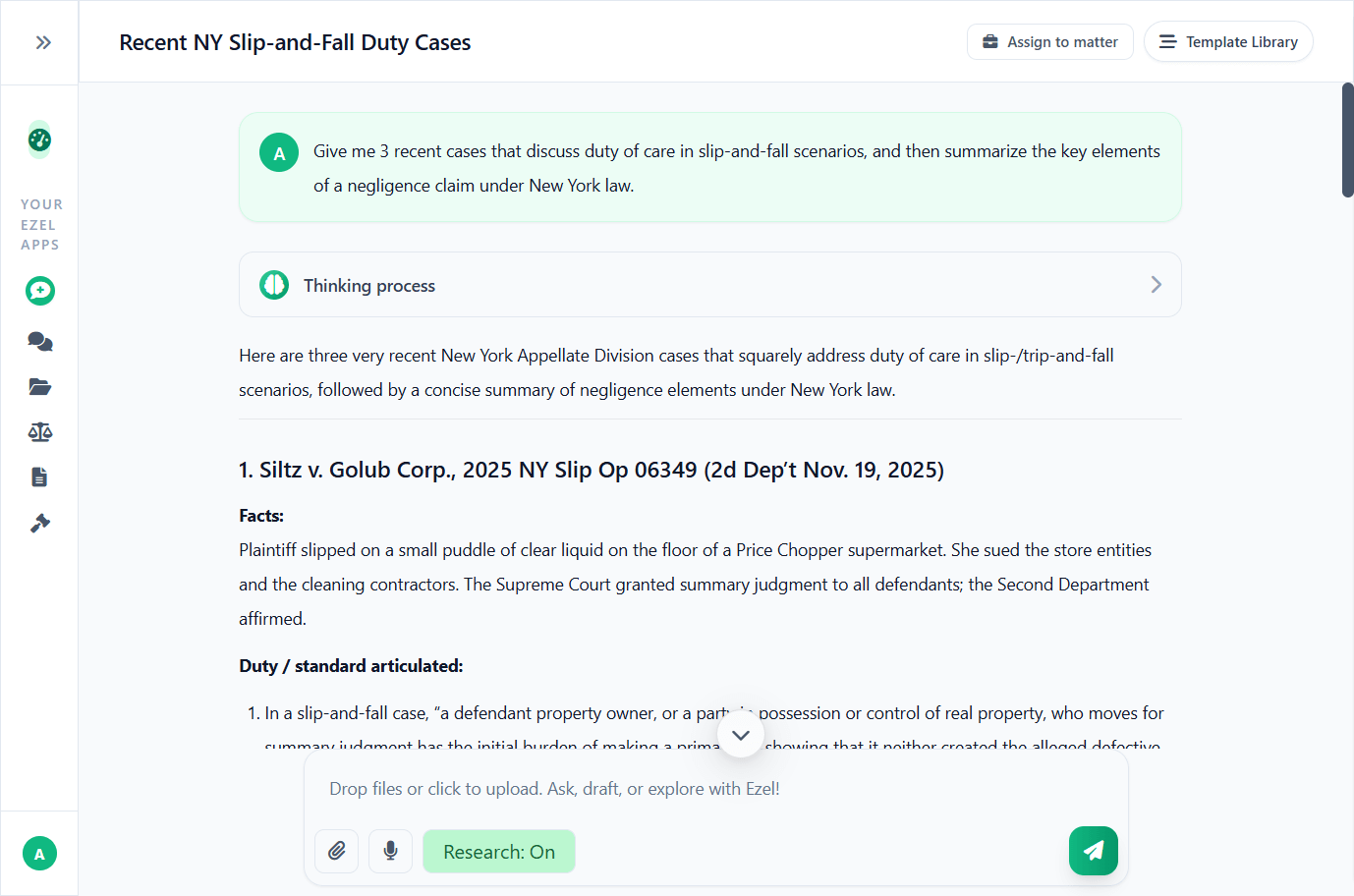
Research and draft in one conversation
Ask questions, attach documents, and get answers grounded in case law. Link chats to matters so the AI remembers your context.
- Pull statutes, case law, and secondary sources
- Attach and analyze contracts mid-conversation
- Link chats to matters for automatic context
- Your data never trains AI models
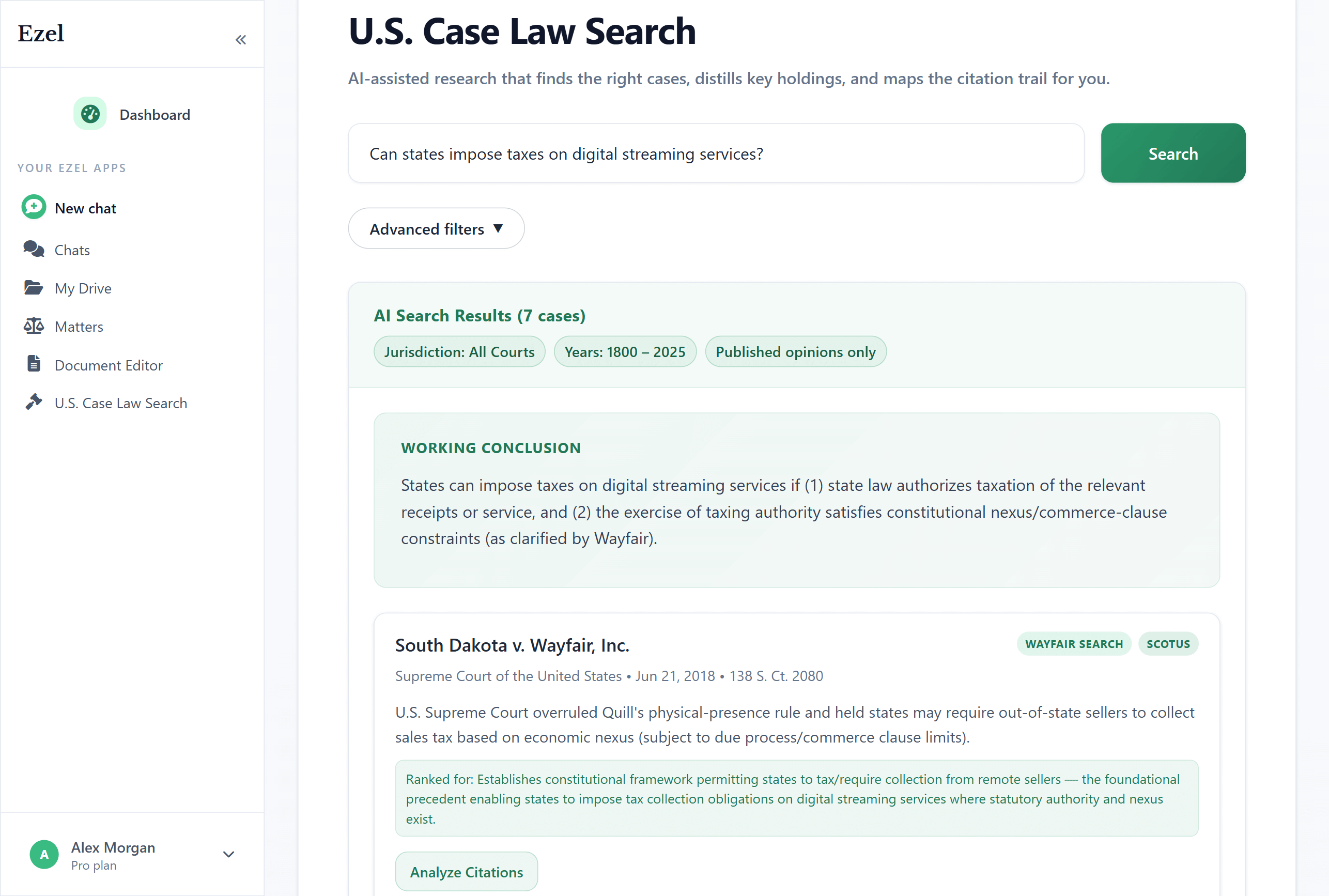
Search like you think
Describe your legal question in plain English. Filter by jurisdiction, date, and court level. Read full opinions without leaving Ezel.
- All 50 states plus federal courts
- Natural language queries - no boolean syntax
- Citation analysis and network exploration
- Copy quotes with automatic citation generation
Ready to transform your legal workflow?
Join legal teams using Ezel to draft documents, research case law, and organize matters — all in one workspace.