LAW FIRM CYBERSECURITY POLICY
POLICY INFORMATION
| Field | Information |
|---|---|
| Law Firm Name | [________________________________] |
| Policy Version | [________________________________] |
| Effective Date | [__/__/____] |
| Last Updated | [__/__/____] |
| Next Review Date | [__/__/____] |
| Policy Owner | [________________________________] |
| Approved By | [________________________________] |
SECTION 1: PURPOSE AND SCOPE
1.1 Purpose
This Cybersecurity Policy establishes requirements and procedures to:
☐ Protect client confidential information and attorney-client privileged communications
☐ Comply with ethical obligations under ABA Model Rules and state bar requirements
☐ Prevent unauthorized access to firm systems and data
☐ Establish security standards for all technology use
☐ Define incident response procedures for security events
☐ Meet regulatory and contractual security requirements
1.2 Scope
This policy applies to:
☐ All attorneys, staff, and contractors of the firm
☐ All firm-owned devices, systems, and networks
☐ Personal devices used for firm business (BYOD)
☐ All data stored, processed, or transmitted by the firm
☐ All third-party vendors with access to firm systems or data
☐ Remote work and travel situations
1.3 Ethical Foundation
Under ABA Model Rule 1.6(c), lawyers must make "reasonable efforts to prevent the inadvertent or unauthorized disclosure of, or unauthorized access to, information relating to the representation of a client."
ABA Formal Opinion 477R clarifies that "reasonable efforts" depends on:
☐ Sensitivity of the information
☐ Likelihood of disclosure if safeguards are not employed
☐ Cost of additional safeguards
☐ Difficulty of implementing safeguards
☐ Extent to which safeguards adversely affect the lawyer's ability to represent clients
SECTION 2: ROLES AND RESPONSIBILITIES
2.1 Information Security Responsibilities
| Role | Responsibilities |
|---|---|
| Managing Partner | ☐ Overall accountability for security program ☐ Approve security policies ☐ Allocate security resources |
| IT Security Lead | ☐ Implement security controls ☐ Monitor security events ☐ Manage incident response ☐ Conduct security training |
| All Attorneys | ☐ Comply with security policies ☐ Report security incidents ☐ Protect client information ☐ Complete security training |
| All Staff | ☐ Follow security procedures ☐ Report suspicious activity ☐ Protect access credentials ☐ Complete security training |
2.2 Security Personnel
| Role | Name | Contact |
|---|---|---|
| IT Security Lead | [________________________________] | [________________] |
| IT Support Contact | [________________________________] | [________________] |
| External IT/MSP Contact | [________________________________] | [________________] |
| Security Incident Contact | [________________________________] | [________________] |
SECTION 3: ACCESS CONTROL
3.1 User Account Management
Account Creation:
☐ Accounts created only upon documented authorization
☐ Unique user ID assigned to each individual
☐ Appropriate access rights based on job function
☐ Temporary/contractor accounts with defined expiration
Account Termination:
☐ Immediate deactivation upon termination of employment
☐ Access review upon role change
☐ Prompt removal of departed personnel from all systems
3.2 Password Requirements
Password Standards:
| Requirement | Standard |
|---|---|
| Minimum Length | [____] characters |
| Complexity | ☐ Uppercase ☐ Lowercase ☐ Numbers ☐ Special Characters |
| Password History | Last [____] passwords cannot be reused |
| Maximum Age | [____] days |
| Lockout Threshold | [____] failed attempts |
| Lockout Duration | [____] minutes |
Password Rules:
☐ Never share passwords with anyone
☐ Never write passwords down in visible locations
☐ Never use the same password for multiple systems
☐ Use password manager if approved: [________________________________]
☐ Never send passwords via email or text
3.3 Multi-Factor Authentication (MFA)
MFA Required For:
☐ Email access (especially remote access)
☐ VPN/remote network access
☐ Cloud services (Microsoft 365, Google Workspace, etc.)
☐ Practice management system
☐ Client portal access
☐ Banking and financial systems
☐ Administrative/privileged access
Approved MFA Methods:
☐ Authenticator app (preferred)
☐ Hardware security key
☐ SMS verification (if other options unavailable)
3.4 Physical Access
☐ Secure access to server rooms and IT equipment
☐ Visitor sign-in and escort requirements
☐ Clean desk policy for sensitive documents
☐ Screen lock when leaving workstation
☐ Secure disposal of documents (shredding)
SECTION 4: DATA PROTECTION
4.1 Data Classification
| Classification | Description | Examples | Handling Requirements |
|---|---|---|---|
| Confidential | Highly sensitive client data | Client files, privileged communications, strategy documents | Encryption required, restricted access |
| Internal | Sensitive firm data | Financial records, HR files, firm strategy | Access controls, secure storage |
| Public | Non-sensitive information | Marketing materials, public filings | Standard handling |
4.2 Encryption Requirements
Data at Rest:
☐ Full disk encryption on all laptops and portable devices
☐ Encryption of backup media
☐ Database encryption for sensitive data
☐ Encrypted storage for client files
Data in Transit:
☐ TLS 1.2 or higher for web traffic
☐ Encrypted email for sensitive communications
☐ VPN for remote access
☐ Secure file transfer methods
Encryption Standards:
| Use Case | Minimum Standard |
|---|---|
| Disk Encryption | AES-256 or equivalent |
| Email Encryption | TLS 1.2+, S/MIME, or PGP |
| File Encryption | AES-256 |
| VPN | IPSec or SSL VPN with strong encryption |
4.3 Sensitive Data Handling
Special Categories:
☐ Protected Health Information (PHI) - HIPAA requirements
☐ Financial account information
☐ Social Security numbers
☐ Trade secrets and proprietary information
☐ Information subject to protective orders
Handling Requirements:
☐ Minimize collection and retention of sensitive data
☐ Access on need-to-know basis only
☐ Enhanced encryption for transmission
☐ Secure disposal when no longer needed
☐ Document retention policy compliance
SECTION 5: EMAIL AND COMMUNICATION SECURITY
5.1 Email Security
General Requirements:
☐ Use firm email for all client communications
☐ Review recipient addresses before sending
☐ Use "Bcc" for group communications to protect addresses
☐ Include confidentiality notice in email signature
☐ Do not open unexpected attachments or links
Sensitive Communications:
☐ Use encryption for highly sensitive matters
☐ Consider secure client portal for document exchange
☐ Obtain client consent for electronic communication
☐ Use redaction appropriately
☐ Verify recipient before sending sensitive information
5.2 Phishing Prevention
Recognition:
☐ Unexpected or urgent requests for information/money
☐ Suspicious sender addresses
☐ Grammatical errors or unusual formatting
☐ Links that don't match expected destinations
☐ Requests to bypass normal procedures
Response:
☐ Do NOT click links or open attachments if suspicious
☐ Report to IT immediately: [________________________________]
☐ Verify requests through known contact information
☐ Forward suspicious emails to: [________________________________]
5.3 Client Communication
Establishing Communication Preferences:
☐ Discuss communication preferences during intake
☐ Document preferred communication methods
☐ Explain risks of unencrypted communication
☐ Obtain written consent for electronic communication
☐ Verify contact information periodically
SECTION 6: NETWORK AND SYSTEM SECURITY
6.1 Network Security
Firewall and Perimeter Security:
☐ Firewall protecting all network entry points
☐ Intrusion detection/prevention system
☐ Regular security updates and patches
☐ Network segmentation for sensitive systems
☐ Secure wireless network configuration
Wireless Network:
| Network | Purpose | Access |
|---|---|---|
| Firm Network | Staff devices | WPA3/WPA2-Enterprise, password protected |
| Guest Network | Visitors | Isolated, separate from firm network |
6.2 Endpoint Security
Required on All Firm Devices:
☐ Antivirus/anti-malware software
☐ Automatic security updates enabled
☐ Host-based firewall
☐ Full disk encryption
☐ Screen lock after [____] minutes of inactivity
☐ Remote wipe capability (mobile devices)
Prohibited:
☐ Disabling security software
☐ Installing unapproved software
☐ Connecting to unsecured networks for firm work
☐ Using public computers for firm systems
6.3 Remote Access
VPN Requirements:
☐ VPN required for remote access to firm network
☐ Split tunneling disabled
☐ Automatic disconnect after [____] minutes of inactivity
☐ Multi-factor authentication required
Remote Work Security:
☐ Secure home network with strong password
☐ Avoid public WiFi for sensitive work
☐ Use mobile hotspot if public WiFi necessary
☐ Ensure privacy when working in public spaces
☐ Lock devices when unattended
SECTION 7: MOBILE DEVICE AND BYOD POLICY
7.1 Firm-Owned Mobile Devices
Security Requirements:
☐ Strong passcode/biometric lock
☐ Encryption enabled
☐ Remote wipe capability
☐ Automatic updates enabled
☐ Approved apps only
☐ No jailbreaking or rooting
7.2 Personal Devices (BYOD)
Eligibility:
☐ Personal devices allowed for firm business: ☐ Yes ☐ No
☐ Approval required from: [________________________________]
Requirements for Approved Personal Devices:
☐ Current operating system with security updates
☐ Screen lock with PIN, password, or biometric
☐ Encryption enabled
☐ Antivirus software (if available for platform)
☐ Consent to remote wipe of firm data
☐ No use of firm email on shared family devices
☐ Agreement to security policy terms
7.3 Lost or Stolen Devices
Immediate Actions:
☐ Report to IT immediately: [________________________________]
☐ Report to supervisor
☐ Change passwords for accounts accessed on device
☐ Request remote wipe if necessary
☐ File police report if theft occurred
SECTION 8: VENDOR AND THIRD-PARTY SECURITY
8.1 Vendor Assessment
Before Engaging Vendors with Data Access:
☐ Review vendor security practices
☐ Request security certifications (SOC 2, ISO 27001)
☐ Evaluate data handling procedures
☐ Review incident response capabilities
☐ Verify data backup and recovery procedures
8.2 Contractual Requirements
Vendor Agreements Must Include:
☐ Confidentiality and data protection terms
☐ Security standards requirements
☐ Incident notification requirements
☐ Right to audit
☐ Data return/destruction upon termination
☐ Subcontractor restrictions
8.3 Cloud Services
Approved Cloud Services:
| Service | Purpose | Security Level |
|---|---|---|
| [________________________________] | [____________] | [____________] |
| [________________________________] | [____________] | [____________] |
| [________________________________] | [____________] | [____________] |
| [________________________________] | [____________] | [____________] |
☐ Only approved cloud services may be used for firm data
☐ Personal cloud storage (Dropbox, personal Google Drive) prohibited for client data
SECTION 9: INCIDENT RESPONSE
9.1 Incident Types
| Category | Examples |
|---|---|
| Security Breach | Unauthorized access to systems or data |
| Malware | Virus, ransomware, or other malicious software |
| Phishing | Successful phishing attack or credential theft |
| Data Loss | Lost or stolen device, accidental data exposure |
| System Compromise | Hacked accounts, unauthorized changes |
9.2 Incident Reporting
All personnel must immediately report:
☐ Suspected unauthorized access to systems
☐ Lost or stolen devices
☐ Suspicious emails or phone calls
☐ Unusual system behavior
☐ Suspected malware infection
☐ Accidental disclosure of sensitive information
Report To:
| Contact | Phone | |
|---|---|---|
| IT Security Lead | [____________] | [____________] |
| After Hours | [____________] | [____________] |
| External IT Support | [____________] | [____________] |
9.3 Incident Response Procedures
Phase 1: Identification and Containment
☐ Assess scope and severity of incident
☐ Isolate affected systems if necessary
☐ Preserve evidence
☐ Notify incident response team
☐ Document all actions taken
Phase 2: Eradication and Recovery
☐ Remove threat from systems
☐ Restore systems from clean backups
☐ Reset compromised credentials
☐ Verify system integrity
☐ Monitor for recurrence
Phase 3: Notification and Reporting
☐ Determine notification requirements
☐ Notify affected clients (per ABA Opinion 483)
☐ Notify state bar if required
☐ File data breach notifications as required by law
☐ Notify insurance carrier
☐ Report to law enforcement if appropriate
Phase 4: Post-Incident Review
☐ Conduct incident review
☐ Document lessons learned
☐ Update security controls
☐ Revise policies as needed
☐ Provide additional training if needed
9.4 Data Breach Notification
Per ABA Formal Opinion 483:
☐ When a data breach involving client information is discovered, lawyers have a duty to notify current clients
☐ Notice should include description of the breach and types of information accessed
☐ Notice should describe steps taken to address the breach
☐ Consider whether to notify former clients
☐ Document all notification decisions and actions
SECTION 10: TRAINING AND AWARENESS
10.1 Required Training
| Training | Audience | Frequency | Duration |
|---|---|---|---|
| Security Awareness | All Personnel | Annual | [____] hours |
| Phishing Awareness | All Personnel | Quarterly | [____] minutes |
| New Hire Security | New Hires | At Onboarding | [____] hours |
| Advanced Security | IT Staff | Annual | [____] hours |
| Incident Response | Response Team | Annual | [____] hours |
10.2 Training Topics
☐ Password security and management
☐ Email security and phishing recognition
☐ Data handling and classification
☐ Physical security
☐ Mobile device security
☐ Social engineering awareness
☐ Incident reporting procedures
☐ Ethical obligations for data protection
10.3 Training Records
Training Completion Tracked By: [________________________________]
Training Completion Documented: ☐ Yes
Non-Compliance Consequences: [________________________________]
SECTION 11: COMPLIANCE AND ENFORCEMENT
11.1 Policy Compliance
☐ All personnel must comply with this policy
☐ Compliance verified through periodic audits
☐ Security controls tested regularly
☐ Policy reviewed and updated annually
11.2 Violations
Policy violations may result in:
☐ Additional training requirements
☐ Verbal or written warning
☐ Suspension of access privileges
☐ Disciplinary action up to termination
☐ Reporting to state bar (for attorneys)
☐ Civil or criminal liability
11.3 Exceptions
☐ Exceptions require written approval from: [________________________________]
☐ Exception requests must include business justification
☐ Compensating controls must be documented
☐ Exceptions reviewed annually
SECTION 12: POLICY MAINTENANCE
12.1 Review Schedule
| Review Type | Frequency | Responsible | Last Reviewed |
|---|---|---|---|
| Full Policy Review | Annual | [____________] | [__/__/____] |
| Incident Procedure Review | Annual | [____________] | [__/__/____] |
| Technology Updates | Quarterly | [____________] | [__/__/____] |
| Vendor Review | Annual | [____________] | [__/__/____] |
12.2 Version History
| Version | Date | Changes | Approved By |
|---|---|---|---|
| [____] | [__/__/____] | [________________________________] | [____________] |
| [____] | [__/__/____] | [________________________________] | [____________] |
| [____] | [__/__/____] | [________________________________] | [____________] |
POLICY ACKNOWLEDGMENT
I have read, understand, and agree to comply with the Law Firm Cybersecurity Policy. I understand that violations may result in disciplinary action and that I have an ethical obligation to protect client information.
Name: [________________________________]
Position: [________________________________]
Signature: [________________________________]
Date: [__/__/____]
This policy should be reviewed annually and updated to address new threats, technologies, and regulatory requirements. All personnel should receive a copy and sign an acknowledgment.
Do more with Ezel
This free template is just the beginning. See how Ezel helps legal teams draft, research, and collaborate faster.
AI that drafts while you watch
Tell the AI what you need and watch your document transform in real-time. No more copy-pasting between tools or manually formatting changes.
- Natural language commands: "Add a force majeure clause"
- Context-aware suggestions based on document type
- Real-time streaming shows edits as they happen
- Milestone tracking and version comparison
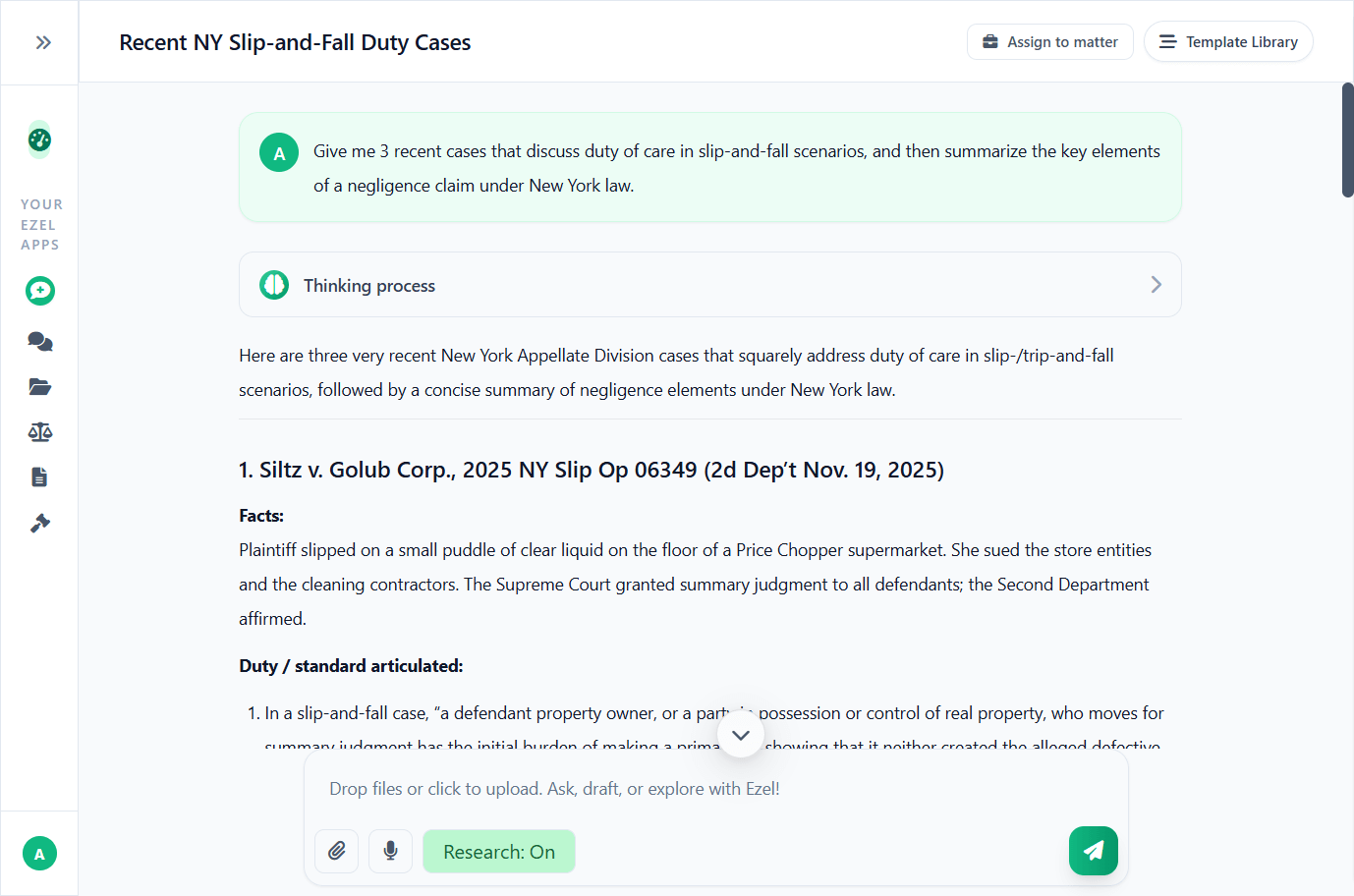
Research and draft in one conversation
Ask questions, attach documents, and get answers grounded in case law. Link chats to matters so the AI remembers your context.
- Pull statutes, case law, and secondary sources
- Attach and analyze contracts mid-conversation
- Link chats to matters for automatic context
- Your data never trains AI models
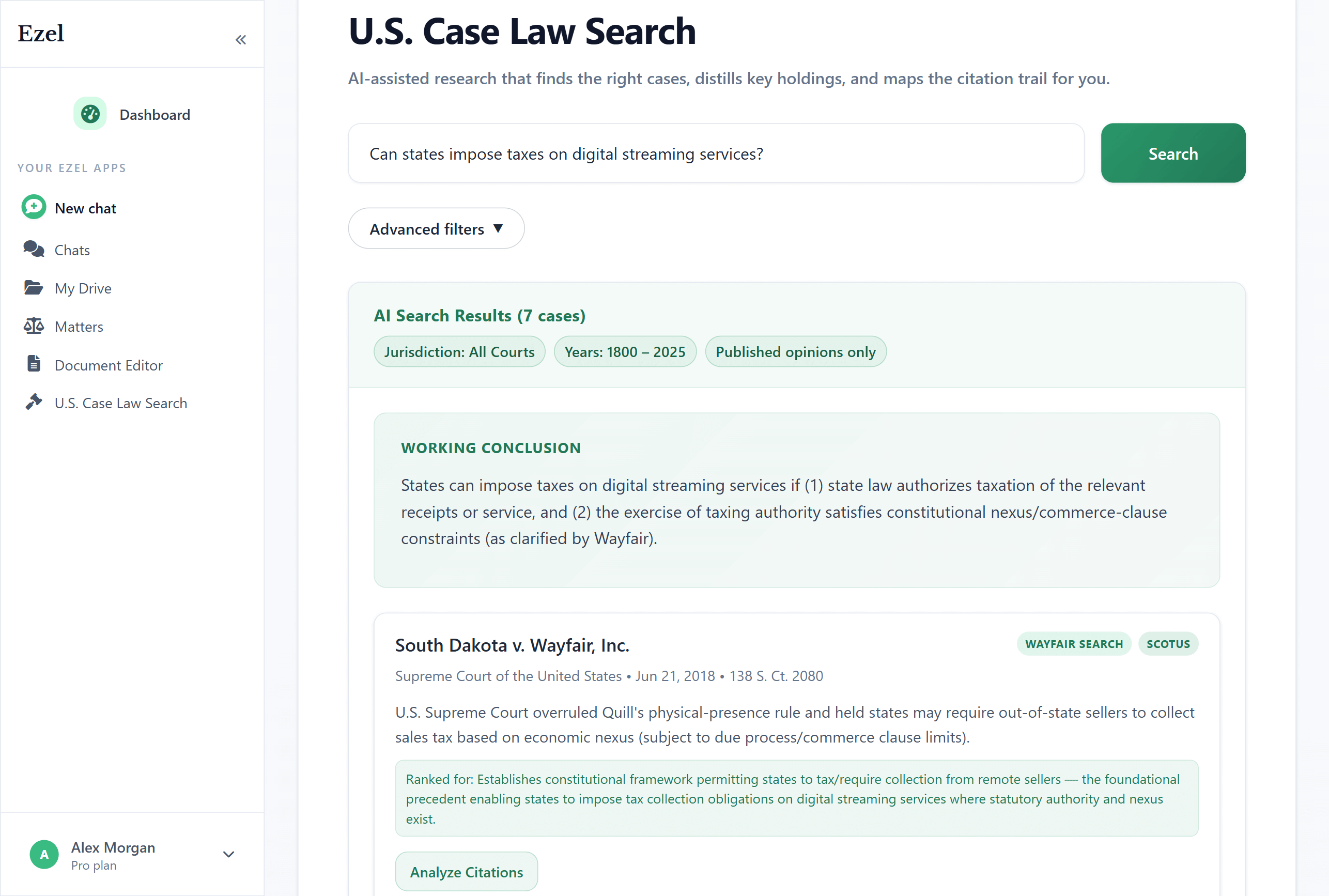
Search like you think
Describe your legal question in plain English. Filter by jurisdiction, date, and court level. Read full opinions without leaving Ezel.
- All 50 states plus federal courts
- Natural language queries - no boolean syntax
- Citation analysis and network exploration
- Copy quotes with automatic citation generation
Ready to transform your legal workflow?
Join legal teams using Ezel to draft documents, research case law, and organize matters — all in one workspace.