CONFLICT TRACKING DATABASE SYSTEM
System Overview
This template provides a comprehensive framework for maintaining a law firm conflict database in compliance with ABA Model Rules requiring "adequate conflict-checking systems."
Part 1: Master Client Register
Client Information Record
| Field | Data Entry |
|---|---|
| Client ID | [________] |
| Date Added | [__/__/____] |
| Client Type | ☐ Individual ☐ Corporation ☐ LLC ☐ Partnership ☐ Government ☐ Non-Profit ☐ Trust/Estate |
| Full Legal Name | [________________________________] |
| Also Known As (AKA) | [________________________________] |
| Former/Maiden Names | [________________________________] |
| Trade Names/DBAs | [________________________________] |
| Date of Birth | [__/__/____] |
| SSN (last 4) | XXX-XX-[____] |
| EIN/Tax ID | [________________________________] |
| State of Formation | [________________________________] |
| Primary Address | [________________________________] |
| City, State, ZIP | [________________________________] |
| Phone | [________________________________] |
| [________________________________] | |
| Referred By | [________________________________] |
| Client Status | ☐ Active ☐ Former ☐ Prospective ☐ Declined |
| Originating Attorney | [________________________________] |
| Responsible Attorney | [________________________________] |
| Date First Represented | [__/__/____] |
| Date Last Represented | [__/__/____] |
Part 2: Related Party Records
For Each Client, Track All Related Parties
Related Party Entry Form
| Field | Data Entry |
|---|---|
| Related Party ID | [________] |
| Linked Client ID | [________] |
| Relationship Type | ☐ Spouse ☐ Parent ☐ Child ☐ Sibling ☐ Business Partner ☐ Officer ☐ Director ☐ Shareholder ☐ Employee ☐ Subsidiary ☐ Parent Company ☐ Affiliate ☐ Other |
| Full Legal Name | [________________________________] |
| AKA/Former Names | [________________________________] |
| Entity Type | ☐ Individual ☐ Entity |
| Date of Birth/Formation | [__/__/____] |
| ID Number | [________________________________] |
| Ownership Percentage | [____]% |
| Role/Title | [________________________________] |
| Date Added | [__/__/____] |
| Notes | [________________________________] |
Part 3: Matter Register
Matter Information Record
| Field | Data Entry |
|---|---|
| Matter ID | [________] |
| Client ID | [________] |
| Matter Name | [________________________________] |
| Matter Description | [________________________________] |
| Practice Area | [________________________________] |
| Matter Type | ☐ Litigation ☐ Transactional ☐ Regulatory ☐ Advisory ☐ Other |
| Date Opened | [__/__/____] |
| Date Closed | [__/__/____] |
| Matter Status | ☐ Open ☐ Closed ☐ Pending ☐ On Hold |
| Responsible Attorney | [________________________________] |
| Supervising Attorney | [________________________________] |
| Conflict Check Date | [__/__/____] |
| Conflict Check By | [________________________________] |
| Conflict Cleared | ☐ Yes ☐ No ☐ With Waiver |
| Waiver on File | ☐ Yes ☐ No ☐ N/A |
| Billing Status | ☐ Hourly ☐ Flat Fee ☐ Contingency ☐ Pro Bono |
Part 4: Adverse Party Register
Adverse Party Information Record
| Field | Data Entry |
|---|---|
| Adverse Party ID | [________] |
| Linked Matter ID | [________] |
| Party Type | ☐ Individual ☐ Corporation ☐ LLC ☐ Partnership ☐ Government ☐ Other |
| Full Legal Name | [________________________________] |
| AKA/Former Names | [________________________________] |
| Date of Birth | [__/__/____] |
| Entity ID/EIN | [________________________________] |
| Address | [________________________________] |
| Counsel Name | [________________________________] |
| Counsel Firm | [________________________________] |
| Role in Matter | ☐ Defendant ☐ Plaintiff ☐ Opposing Party ☐ Counter-Party ☐ Third Party ☐ Other |
| Date Added | [__/__/____] |
| Notes | [________________________________] |
Part 5: Conflict Waiver Register
Waiver Documentation Record
| Field | Data Entry |
|---|---|
| Waiver ID | [________] |
| Matter ID | [________] |
| Waiver Date | [__/__/____] |
| Waiver Type | ☐ Current Client ☐ Former Client ☐ Prospective Client ☐ Joint Representation |
| Waiving Party Name | [________________________________] |
| Waiving Party Client ID | [________] |
| Conflict Description | [________________________________] |
| Waiver Letter Date | [__/__/____] |
| Waiver Signed Date | [__/__/____] |
| Waiver Document Location | [________________________________] |
| Prepared By | [________________________________] |
| Approved By | [________________________________] |
| Expiration Date | [__/__/____] or ☐ No Expiration |
| Conditions/Limitations | [________________________________] |
Part 6: Attorney/Staff Register
For Lateral Hire Conflict Checking
| Field | Data Entry |
|---|---|
| Person ID | [________] |
| Full Name | [________________________________] |
| Role | ☐ Attorney ☐ Paralegal ☐ Legal Assistant ☐ Staff |
| Bar Number | [________________________________] |
| Hire Date | [__/__/____] |
| Termination Date | [__/__/____] |
| Status | ☐ Active ☐ Inactive ☐ Former |
| Prior Firm(s) | [________________________________] |
| Government Service | ☐ Yes ☐ No Agency: [________________] |
| Disclosure Form Date | [__/__/____] |
| Disclosure Form Location | [________________________________] |
Lateral Hire Prior Matter Record
| Prior Client/Matter | Prior Firm | Dates | Role | Screened? |
|---|---|---|---|---|
| [________________________________] | [________________] | [________] | [________] | ☐ Yes ☐ No |
| [________________________________] | [________________] | [________] | [________] | ☐ Yes ☐ No |
| [________________________________] | [________________] | [________] | [________] | ☐ Yes ☐ No |
Part 7: Ethical Screen Register
Screen Documentation Record
| Field | Data Entry |
|---|---|
| Screen ID | [________] |
| Matter ID | [________] |
| Screened Person | [________________________________] |
| Screen Start Date | [__/__/____] |
| Screen End Date | [__/__/____] |
| Reason for Screen | ☐ Former Government Lawyer ☐ Lateral Hire ☐ Other |
| Notice to Affected Party Date | [__/__/____] |
| Screen Components Implemented |
☐ Written memo to all personnel
☐ Physical file segregation
☐ Electronic access restriction
☐ Fee exclusion
☐ Periodic certifications required
☐ Other: [________________________________]
| Compliance Certifications | |
| Date | Certified By | Compliant? |
|---|---|---|
| [__/__/____] | [________________________________] | ☐ Yes ☐ No |
| [__/__/____] | [________________________________] | ☐ Yes ☐ No |
| [__/__/____] | [________________________________] | ☐ Yes ☐ No |
Part 8: Search Log
Conflict Search History
| Search ID | Date | Searched By | Search Terms | Matters Checked | Result |
|---|---|---|---|---|---|
| [____] | [__/__/____] | [________________] | [________________________________] | [____] | ☐ Clear ☐ Conflict |
| [____] | [__/__/____] | [________________] | [________________________________] | [____] | ☐ Clear ☐ Conflict |
| [____] | [__/__/____] | [________________] | [________________________________] | [____] | ☐ Clear ☐ Conflict |
| [____] | [__/__/____] | [________________] | [________________________________] | [____] | ☐ Clear ☐ Conflict |
| [____] | [__/__/____] | [________________] | [________________________________] | [____] | ☐ Clear ☐ Conflict |
Part 9: Database Maintenance Schedule
Regular Maintenance Tasks
| Task | Frequency | Last Completed | Next Due | Responsible Party |
|---|---|---|---|---|
| Verify all open matters current | Monthly | [__/__/____] | [__/__/____] | [________________] |
| Update closed matter status | Weekly | [__/__/____] | [__/__/____] | [________________] |
| Review stale entries | Quarterly | [__/__/____] | [__/__/____] | [________________] |
| Backup database | Daily | [__/__/____] | [__/__/____] | [________________] |
| Audit for completeness | Annually | [__/__/____] | [__/__/____] | [________________] |
| Train new staff on system | As needed | [__/__/____] | [__/__/____] | [________________] |
Part 10: Required Data Entry Triggers
When to Add/Update Database
☐ New client intake - Add client and all related parties
☐ New matter opened - Add matter and all adverse parties
☐ New adverse party identified - Add to adverse party register
☐ New party added to existing matter - Update matter record
☐ Client name change - Update client record, retain old names as AKA
☐ Matter closed - Update status and closing date
☐ Lateral attorney/staff hired - Add person and all prior matters
☐ Attorney/staff departure - Update status
☐ Conflict waiver obtained - Add to waiver register
☐ Ethical screen implemented - Add to screen register
☐ Corporate reorganization - Update all affected entity records
Part 11: Search Protocol
Standard Search Procedure
Step 1: Gather Information
☐ Full legal names of all parties
☐ All known aliases, AKAs, former names
☐ Dates of birth (individuals)
☐ Entity identification numbers
☐ Corporate affiliates and related entities
☐ Key individuals (officers, directors, shareholders >10%)
☐ Spouses and family members (where relevant)
Step 2: Execute Searches
☐ Exact name match
☐ Phonetic/similar name match
☐ Partial name match
☐ Reverse search (by matter type/practice area)
☐ Date-based search (matters during specific period)
Step 3: Analyze Results
☐ Review all matches
☐ Determine if same party or different party with same name
☐ Check all related party records
☐ Check all adverse party records
☐ Review closed matters for former client conflicts
Step 4: Document Results
☐ Log search in Search Log
☐ Complete Conflict Check Form
☐ Escalate potential conflicts for attorney review
Part 12: Data Fields Quick Reference
Minimum Required Fields for Compliance
For Every Client:
- Full legal name
- All known aliases/former names
- Date of birth or entity ID
- Client type
- Status (active/former/prospective)
- Date first/last represented
For Every Matter:
- Client link
- Matter description
- Practice area
- Open/close dates
- Responsible attorney
- Conflict check documentation
For Every Adverse Party:
- Full legal name
- All known aliases
- Date of birth or entity ID
- Linked matter
Part 13: System Administration
Database Access Controls
| Access Level | Permissions | Assigned To |
|---|---|---|
| Administrator | Full access - add, edit, delete, report | [________________________________] |
| Attorney | Search, add, view, limited edit | [________________________________] |
| Paralegal | Search, add, view | [________________________________] |
| Staff | Search, view only | [________________________________] |
Audit Trail Requirements
☐ All additions logged with user and timestamp
☐ All edits logged with user, timestamp, and prior value
☐ All deletions logged with user, timestamp, and deleted record
☐ All searches logged with user, timestamp, and search terms
☐ Audit logs retained for [____] years
Sources and References
Do more with Ezel
This free template is just the beginning. See how Ezel helps legal teams draft, research, and collaborate faster.
AI that drafts while you watch
Tell the AI what you need and watch your document transform in real-time. No more copy-pasting between tools or manually formatting changes.
- Natural language commands: "Add a force majeure clause"
- Context-aware suggestions based on document type
- Real-time streaming shows edits as they happen
- Milestone tracking and version comparison
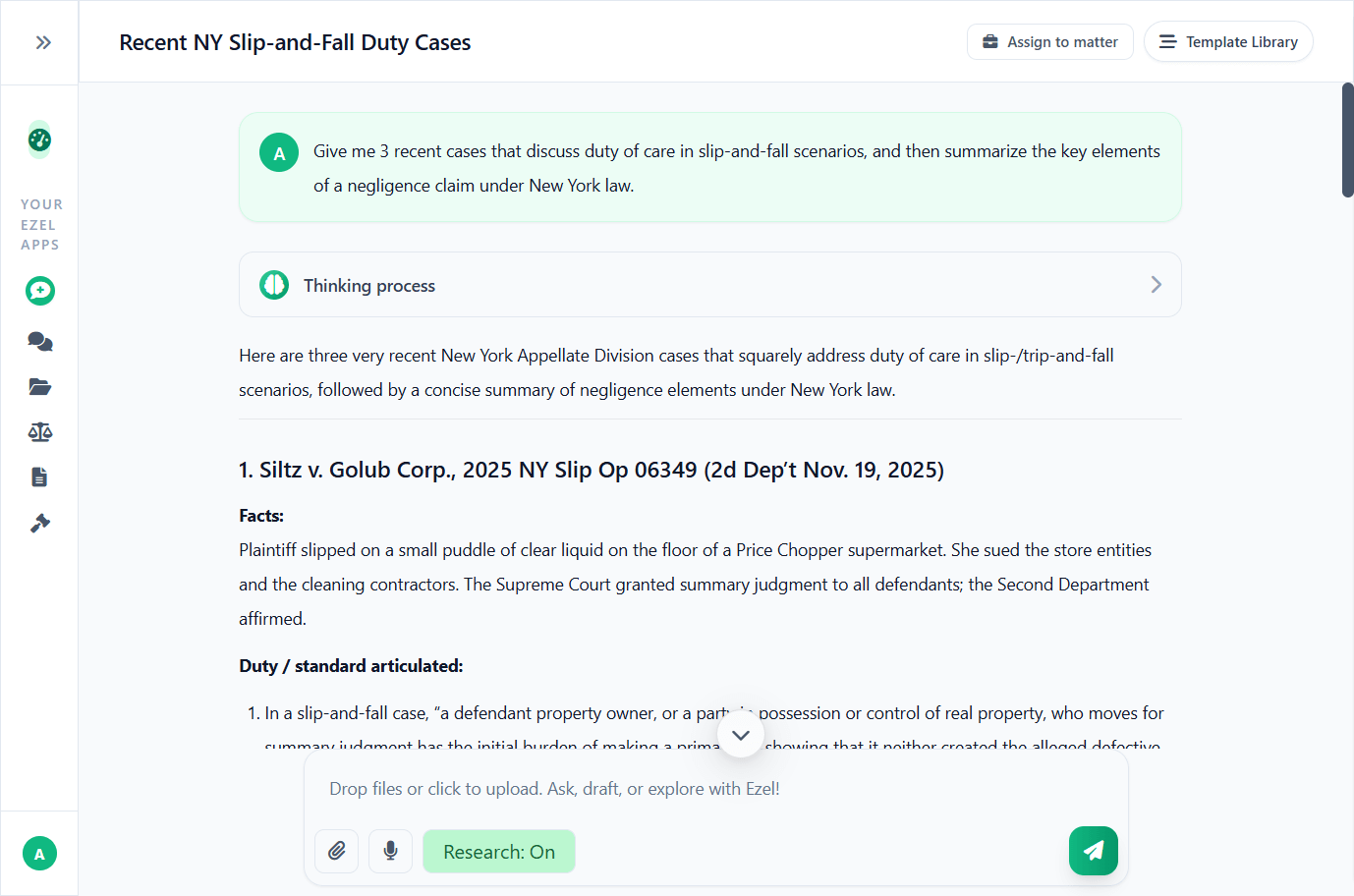
Research and draft in one conversation
Ask questions, attach documents, and get answers grounded in case law. Link chats to matters so the AI remembers your context.
- Pull statutes, case law, and secondary sources
- Attach and analyze contracts mid-conversation
- Link chats to matters for automatic context
- Your data never trains AI models
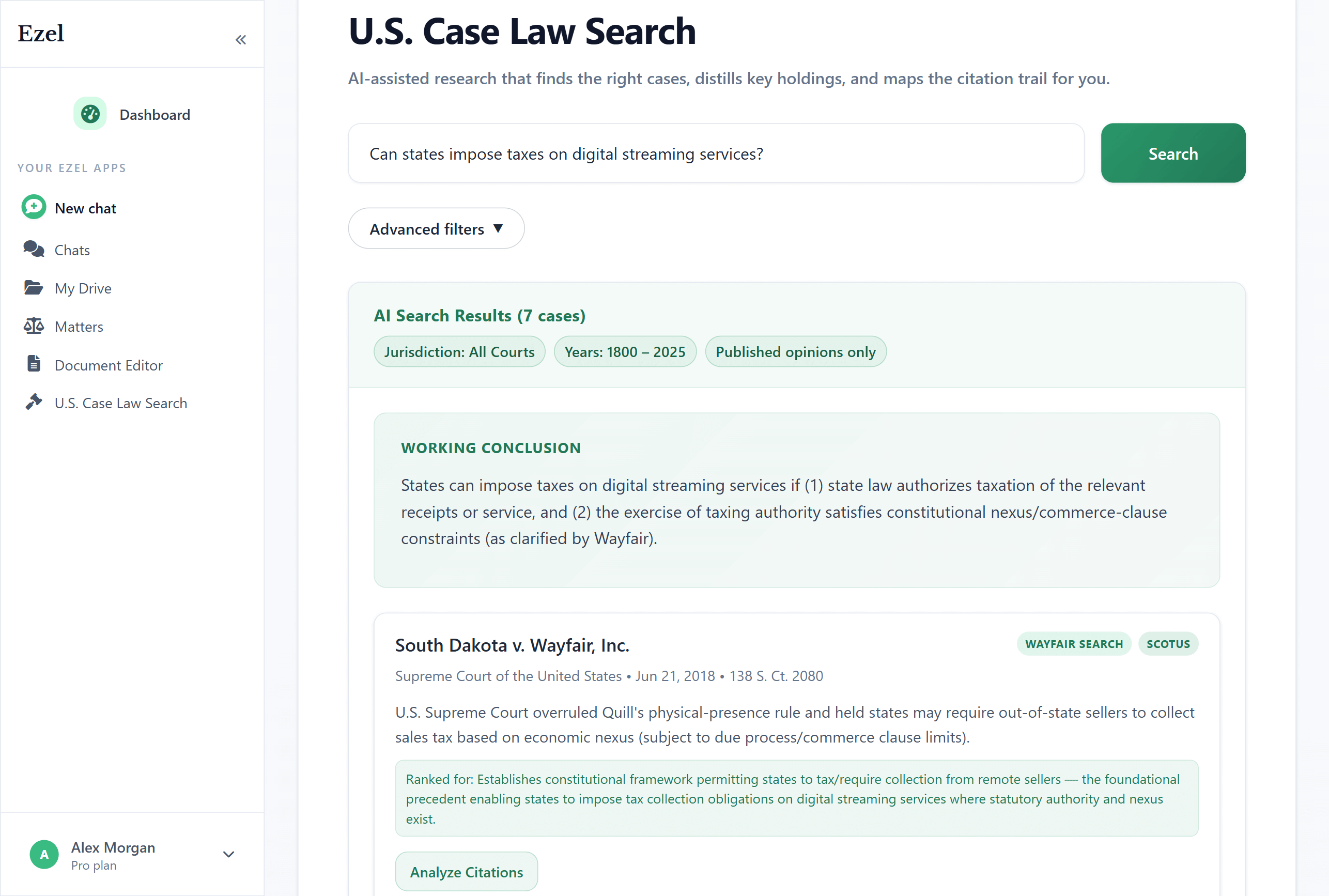
Search like you think
Describe your legal question in plain English. Filter by jurisdiction, date, and court level. Read full opinions without leaving Ezel.
- All 50 states plus federal courts
- Natural language queries - no boolean syntax
- Citation analysis and network exploration
- Copy quotes with automatic citation generation
Ready to transform your legal workflow?
Join legal teams using Ezel to draft documents, research case law, and organize matters — all in one workspace.